


Angular performance optimization has evolved with modern features and application level practices offering targeted improvements in rendering, loading and responsiveness. While AOT compilation, RxJS cleanup and advanced state management remain useful, they aren’t always the first optimizations to prioritize.
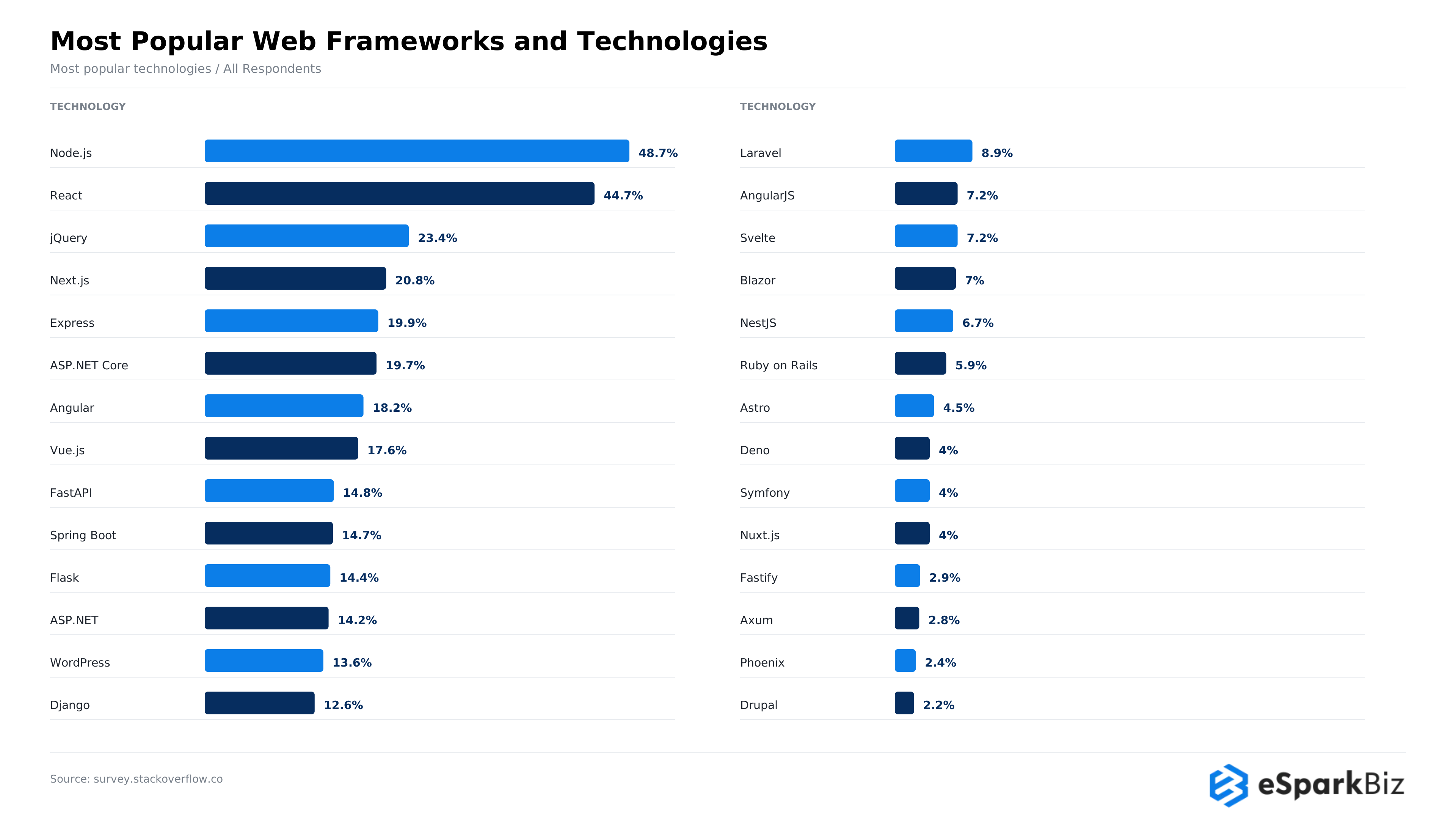
Angular currently has a 18.2% usage rate among frontend developers, according to recent survey data, putting it nearly on par with Vue at 17.6% and confirming it remains a mainstream choice rather than a legacy one.
Angular has also optimized its reactivity model. Signals and zoneless change detection improve performance through state tracking and targeted UI updates, respectively, without doing unnecessary work.
We reviewed current Angular performance recommendations across documentation, technical blogs, developer forums and community discussions to separate proven Angular practices from advice tied to earlier versions of the framework.
The result is a focused set of techniques covering rendering, loading and server side performance. Each one addresses a practical problem that can affect responsiveness, scalability or the amount of work your application performs.
Our Approach for Evaluating Angular Performance
We evaluated Angular performance across eight key areas to identify common performance issues and practical optimization opportunities.
- Rendering: Reduce unnecessary change detection and DOM updates.
- Reactivity: Choose between Signals and RxJS based on application needs.
- Loading: Use lazy loading to reduce initial load time.
- Images: Optimize image sizes and loading behavior to improve Core Web Vitals.
- Large lists: Apply virtual scrolling when rendering many items affects responsiveness.
- Server-side rendering: Reduce unnecessary asynchronous work that delays page rendering.
- Bundles: Identify heavy dependencies and unnecessary JavaScript.
- Measurement: Use Chrome DevTools, Angular DevTools, and Core Web Vitals to measure performance before and after changes.
How to Profile and Fix a Slow Angular App
Start by reproducing the slowdown and profiling the app with Chrome DevTools and Angular DevTools. Identify the main performance issues, apply a targeted fix, and measure the same metrics again to verify the improvement.
This approach helps prioritize measurable performance gains over optimizations that offer little practical benefit.
Best 10 Angular Performance Tips aligned with How the Framework Works
The following tips discuss specific issues that exist in the rendering of the application, data request and loading issues. The tips describe the architecture of current signals and focus on ways to decrease unneeded tasks and increase application responsiveness.
Tip 1: Go Zoneless to Cut Unnecessary Render Cycles
Using Zoneless, Angular does not have to rely on Zone.js to perform change detection. With browser and asynchronous events, Angular can respond to specific notifications to perform UI updates. Instead of checking broadly after activities and events like timers, Angular can respond to specific notifications to perform a change.
- Fewer checks: Reduces unnecessary change detection work.
- Lower overhead: Removes Zone.js from the runtime.
- Better for complex apps: Handles frequent updates more efficiently.
How to apply it:
// main.ts
import { bootstrapApplication } from “@angular/platform-browser”;
import { provideZonelessChangeDetection } from “@angular/core”;
bootstrapApplication(AppComponent, {
providers: [provideZonelessChangeDetection()],
});
Where it matters most:
Zoneless is useful for dashboards and other applications that have a lot of data as well as frequent polls, WebSocket activity, user interaction and third party integrations.
One thing to watch:
Zoneless applications still need components and libraries that follow Angular’s update patterns. Evaluate legacy components and third party integrations before implementing this across a production application.
Did You Know?
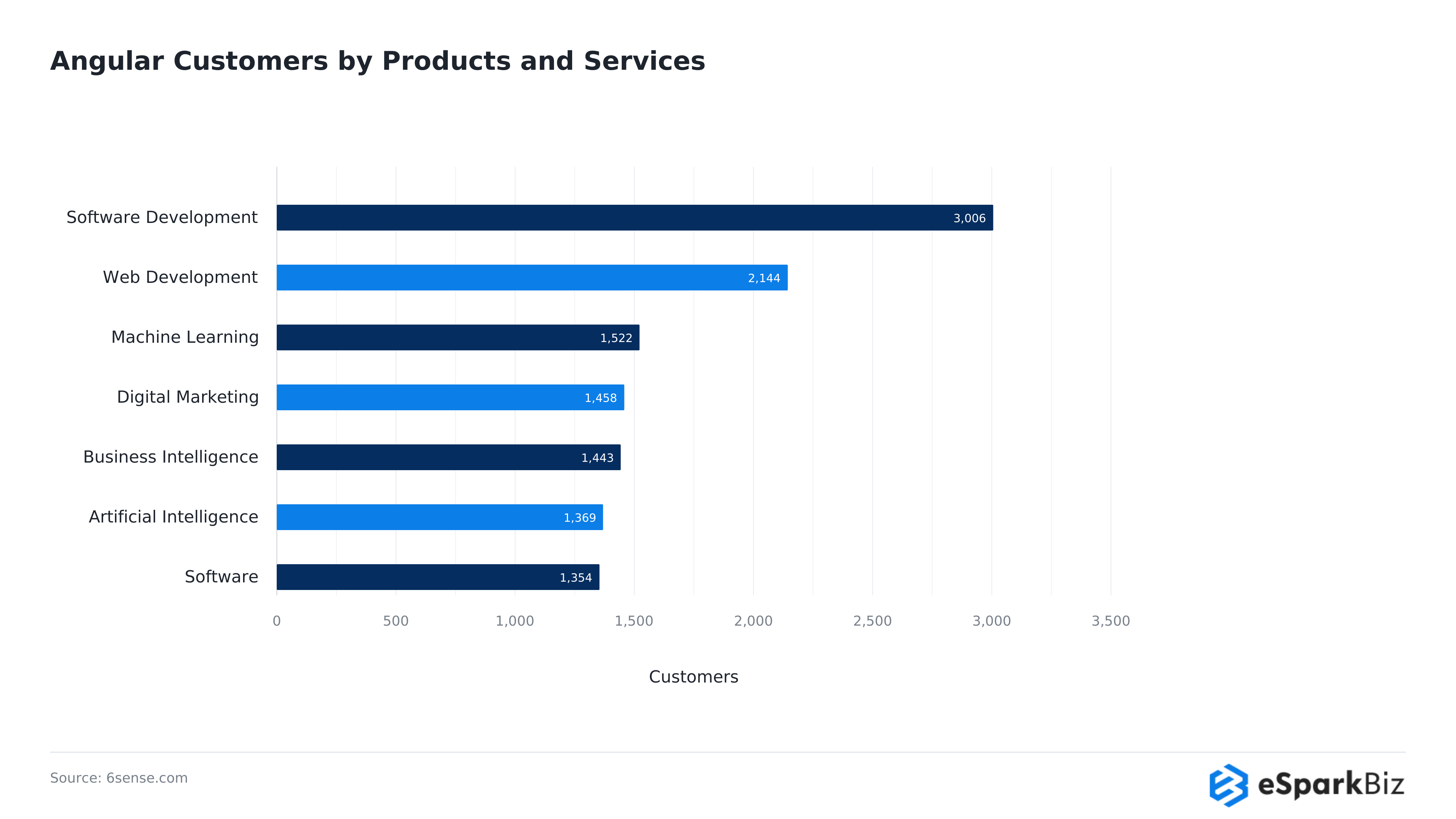
Software and technology companies make up the largest share of Angular’s tracked customer base. 6sense data shows Software Development leading with 3,006 customers, followed by Web Development at 2,144 and Machine Learning at 1,522, reinforcing Angular’s continued hold in technical, product driven organizations.
Tip 2: Use Signals Instead of RxJS for Component State
For component state management, Angular provides signals. Subscription is not required to manage component state with signals. Signals take care of the component state and manage the values presented in the UI.
When it comes to managing the state of HTTP requests and Web Sockets, RxJS can still be used. But, when it comes to managing local states, such as filters, counters or UI controls, a better option might be to use signals.
- Simpler state: No manual subscription cleanup.
- Targeted updates: Angular tracks signal dependencies.
- Zoneless ready: Signal changes can notify Angular when updates are needed.
How to apply it:
import { Component, signal, computed } from “@angular/core”;
@Component({
selector: “app-counter”,
template: `
<p>Count: {{ count() }}</p>
<p>Double: {{ doubleCount() }}</p>
<button (click)=”increment()”>Add</button>
`,
})
export class CounterComponent {
count = signal(0);
doubleCount = computed(() => this.count() * 2);increment() {
this.count.update((value) => value + 1);
}
}
Where it matters most:
Forms, filters, counters and component state that changes frequently through user interaction in production scale applications.
One thing to watch:
Incremental adoption. RxJS can be kept for complex use cases of asynchronous workflows in the application.
Tip 3: Let OnPush do its Job
OnPush directive can be very helpful in large Angular applications, to avoid performing unnecessary change detection work. Angular, in this case, checks a component when any relevant input changes, the component receives an event or when the component is marked for checking.
- Fewer checks: Component checks can be reduced.
- Works with signals: Signals work well with OnPush components.
- Better scalability: Helps to improve the overall performance of large component trees.
Where it matters most:
Component heavy screens such as tables, nested forms, large layouts and components with many sibling components, which previously caused numerous unwanted re-checks.
One thing to watch:
Even with OnPush, dashboards can remain slow due to in-place object mutations, expensive template functions, large lists without virtual scrolling, heavy dependencies, and slow API calls. Use Angular DevTools and Chrome DevTools to identify the actual bottleneck before optimizing.
Expert’s Quote:
“A programming language is for thinking about programs, not for expressing programs you’ve already thought of. It should be a pencil, not a pen.”
– Paul Graham ( Computer Scientist and Writer )
Tip 4: Use Deferrable Views for Smart Rendering
Some parts of a page can wait to load. Deferrable views will delay loading non critical content to Angular until a trigger occurs. This could be the point at which Angular detects the content has entered the viewport, when the content has been interacted with or when the browser is idle.
- Smaller initial load: Angular does not load critical content until it is needed.
- Flexible triggers: Content can be loaded based on the viewport, interaction, idle time or a triggered timer.
- Built-in states: Show placeholder, loading or error content while deferred content loads.
How to apply it:
<div class=”dashboard”>
@for (item of essentialData(); track item.id) {
<app-summary-card [data]=”item”></app-summary-card>
}
@defer (on viewport) {
<app-advanced-chart [data]=”chartData()”></app-advanced-chart>
} @placeholder {
<div>Chart will load when visible</div>
}
</div>
Where it matters most:
Pages typically used to view reports, product details and dashboards that contain a lot of reviews, analytics, recommendations or other sections that are considered less critical.
One thing to watch:
Deferred content should be self contained components or directives. Older modules should be avoided when creating components within the @defer block.
Also Read: Top Benefits of Using AngularJS Framework
Tip 5: Modern Lazy Loading with Smart Preloading
The ability to delay feature code downloads until it is needed by the user is known as lazy loading. Modern Angular makes lazy loading easy with standalone components and loadComponent at the route level and preloading can be done for features expected to be the next ones to be accessed.
- Smaller initial bundle: Load feature code only when needed.
- Selective preloading: Fetch likely next routes without loading everything.
- Standalone friendly: Routes can load components without feature modules.
How to apply it:
// app.routes.ts
export const routes: Routes = [
{ path: “dashboard”, loadComponent: () => import(“./dashboard/dashboard.component”).then(m => m.DashboardComponent) },
{ path: “reports”, loadComponent: () => import(“./reports/reports.component”).then(m => m.ReportsComponent), data: { preload: true } },
];
// selective-preloading.strategy.ts
@Injectable({ providedIn: “root” })
export class SelectivePreloadingStrategy implements PreloadingStrategy {
preload(route: Route, load: () => Observable<unknown>) {
return route.data?.[“preload”] ? load() : of(null);
}
}
// app.config.ts
provideRouter(routes, withPreloading(SelectivePreloadingStrategy));
Where it matters most:
If an application has different feature areas like dashboards, reports, settings, etc. that are accessed at different times by a user.
One thing to watch:
The directive loses its layout shift protection unless an explicit width and height are set on each image.
Community Insight
In Angular’s own GitHub RFC discussion on deferred loading, developers flagged a real gotcha: non standalone components inside a @defer block silently load eagerly instead of erroring, making the mistake easy to miss.
Tip 6: Optimize Images with NgOptimizedImage
Images are an important contributor to page speed. They can increase time to first paint and time to complete all page renderings. The NgOptimizedImage directive assists Angular applications with image renders and image aspect ratios.
- Reduces layout shifts: Explicit dimensions reserve space before images load.
- Prioritizes key images: The priority attribute helps prioritize important above the fold images.
- Supports image loaders: Configurable loaders can integrate with existing CDN infrastructure.
How to apply it:
<img
ngSrc=”hero-banner.jpg”
width=”1200″
height=”600″
priority
alt=”Product overview”
/>
Where it matters most:
This should be used on key product listing pages, landing pages and other pages where a primary image is loaded above the fold.
One thing to watch:
This directive also needs to have an explicit width and height set.
Tip 7: Use @for with track for Efficient List Rendering
Within Angular, @for blocks have built in list tracking, meaning that the framework preserves existing DOM elements when a collection’s data is changed. Angular needs a track expression in order to identify each item and update only the elements that are visibly impacted by the change.
- Required tracking: Angular @for blocks requires a track expression.
- Efficient updates: Angular can reuse existing DOM elements when items change.
- Cleaner syntax: A trackBy function is not required.
How to apply it:
<ul>
@for (item of products(); track item.id) {
<li>{{ item.name }}</li>
}
</ul>
Where it matters most:
Listing products, tables for ordering, dashboards and lists that are constantly changing based upon either user actions or live data.
One thing to watch:
ID should be used when tracking a unique property. Avoid using a tracking by index when items are changed, deleted or reorganized.
Tip 8: Implement Virtual Scrolling for Large Datasets
When rendering a large number of DOM elements, memory usage increases and a browser can take a long time to perform various tasks and even freeze. Virtual scrolling renders elements only in the area of the viewport and it reuses elements after the user navigates through the list.
- Less DOM work: Only visible elements and a small buffer are rendered.
- Lower memory use: Unused elements are not added into the DOM.
- Smoother scrolling: Ahead of the viewport, nearby elements are loaded along with the buffer.
How to apply it:
<cdk-virtual-scroll-viewport itemSize=”60″ class=”viewport”>
@for (item of items(); track item.id) {
<div class=”item”>{{ item.name }}</div>
}
</cdk-virtual-scroll-viewport>
Where it matters most:
For large tables in a logistics admin portal, use virtual scrolling when users browse many rows continuously, server-side pagination for transaction histories and reports, and server-side sorting and filtering to reduce browser workload.
One thing to watch:
Virtual scrolling works best with fixed-height items. Choose the approach based on dataset size, user navigation needs, and measured performance.
What’s New in Angular v22, Angular Team
The Angular team’s own walkthrough of the v22 release, covering the graduation of Signal Forms, Angular Aria and Asynchronous Signals to stable, directly grounding the signals and zoneless shift this guide builds on.
Watch:
Tip 9: Modernize SSR with the PendingTasks API
Server side rendering sends the browser HTML while the complete client application is built in the background and thus improves the application’s initial experience for both users and search engines. With the PendingTasks API, Angular applications are able to inform SSR about what asynchronous work needs to complete.
- Complete critical data: Keep required async work in the server rendered output.
- Reduce hydration issues: Help the client receive HTML matching the desired application state.
- Avoid unnecessary waiting: Mark only required work essential for the initial render.
How to apply it:
// data-loading.service.ts
import { Injectable, inject, PendingTasks } from “@angular/core”;
import { HttpClient } from “@angular/common/http”;
import { pendingUntilEvent } from “@angular/core/rxjs-interop”;
@Injectable({ providedIn: “root” })
export class DataLoadingService {
private http = inject(HttpClient);
getCriticalData() {
return this.http.get(“/api/critical-data”).pipe(pendingUntilEvent());
}
}
Where it matters most:
The initial rendering, SEO, external application loading experience along with other factors matter most for product pages, content platforms and other similar applications.
One thing to watch:
Mark only genuinely critical work as pending. SSR of secondary content may significantly increase page load time and have no positive effect on the initial experience.
Also Read: Why Choose AngularJS for Web Development Project?
Tip 10: Tighten your Bundle with Tree Shakable Imports and Modern Build Tooling
Packing a lot into a single JavaScript bundle adds extra work for a browser to download, parse and execute it. Precise selection of dependencies and tree shakable imports help Angular prune the code an application doesn’t use.
- Import only what you need: Give the bundler more opportunity to remove unused code.
- Limit unnecessary re-exports: Review bundles that can potentially complicate your dependency analysis.
- Use modern Angular tooling: The current build system uses esbuild for building applications and Vite for the development server.
How to apply it:
// Avoid
import * as _ from “lodash”;
// Prefer
import { debounce } from “lodash-es”;
Where it matters most:
When utilizing library dependencies such as utility libraries, date libraries, charting libraries and large UI component libraries.
One thing to watch:
Regularly check your production bundles, what looks small and harmless during development can add a significant amount of weight to the final build.
How Teams can Verify these Optimizations are Working
Performance improvements should be measured before and after each change. Use Angular tools, browser profiling, and production monitoring to track loading speed, rendering behavior, runtime errors, and real-user experience.
| Tool | What It Measures | Best For |
| Angular DevTools | Change detection cycles, component rendering | Verifying reduced unnecessary checks |
| Chrome DevTools | Memory usage, network activity, rendering timeline | Identifying runtime bottlenecks |
| Lighthouse | Core Web Vitals, accessibility, SEO | Checking whether LCP is under 2.5 seconds |
| WebPageTest | Load speed across devices and networks | Evaluating lazy loading and deferred views |
| RUM and error tracking | Real-user performance, JavaScript errors, failed requests | Monitoring production performance and detecting regressions |
Production monitoring matters: Real User Monitoring (RUM) reveals how Angular applications perform across actual devices, networks, and user sessions, while error tracking helps teams identify runtime failures that affect performance.
How to Prevent Angular Performance Regressions
New features and dependencies can increase rendering work and bundle size. Prevent regressions with these practices:
- Set CI performance budgets: Limit bundle size and build output.
- Run Lighthouse on pull requests: Catch performance regressions early.
- Monitor production: Use RUM and error tracking to identify issues.
- Profile regularly: Recheck high-traffic screens after major changes.
Key takeaway: Treat performance as an ongoing engineering requirement, not a one-time fix.
Angular Performance Optimization Checklist
Use this 10-point checklist to review rendering, state management, loading, and monitoring practices before releasing an Angular application, helping teams identify bottlenecks and maintain responsive user experiences as applications grow.
- Enable zoneless change detection where compatible with your application.
- Use Signals for component state and RxJS for complex asynchronous workflows.
- Apply OnPush to reduce unnecessary component checks.
- Defer non-critical content using @defer.
- Lazy-load feature routes and selectively preload likely next routes.
- Optimize images with NgOptimizedImage and explicit dimensions.
- Track list items with unique IDs using @for.
- Use virtual scrolling for large, frequently browsed datasets.
- Optimize SSR tasks by marking only critical asynchronous work as pending.
- Analyze production bundles and measure performance using Angular DevTools, Chrome DevTools, Lighthouse, and real-user monitoring.
Use this checklist during performance reviews and before major releases. Prioritize the issues identified through profiling, then measure the results to confirm that each optimization improves the user experience.
Angular Development and Performance Optimization With eSparkBiz
eSparkBiz supports Angular development, performance audits, and application modernization for businesses seeking better performance and maintainability. Teams can assess Core Web Vitals, identify bottlenecks, and prioritize fixes based on project scope and deadlines.
- Performance audits and fixes: Identify rendering, loading, and change detection issues, then build a prioritized optimization plan. Completing improvements within a few weeks depends on application complexity and the issues found.
- Angular development expertise: Evaluate experience with Signals, zoneless change detection, and legacy application upgrades.
- US team collaboration: Align sprint planning, progress reviews, and technical discussions with US working hours.
- Flexible hiring models: Choose a dedicated Angular team, project-based engagement, or staff augmentation based on your team’s capacity.
Before hiring: Confirm the audit scope, Core Web Vitals targets, delivery timeline, team availability, contract terms, and ongoing support.
Frequently Asked Questions
My Angular app feels slow even after basic optimization. What should I check first?
Start with Angular DevTools and browser performance tools. Look for rendering, bundle size, number of network requests and expensive components. Once identified, you can proceed with optimizations.
We're seeing too many change detection cycles slowing down our dashboard. How do we fix this?
Identify what triggers updates, such as frequent events, polling, WebSocket activity or third party integrations. We can also look into Zoneless change detection along with signals to reduce the number of work requests that are redundant.
How can I identify Angular performance issues and common mistakes?
Use Angular DevTools to inspect change detection and Chrome DevTools to analyze rendering, bundle size, and API requests. Watch for expensive template functions, unstable list tracking, unnecessary re-renders, and oversized dependencies. Optimize the main bottleneck and measure again.
What is zoneless change detection in Angular?
- A change detection mode that removes Zone.js from the app
- Angular updates the UI only when a signal changes, not after every async event
- Reduces bundle size and unnecessary render checks compared to the older default
Do Angular Signals replace RxJS entirely?
Not at all. Angular Signals are well suited for synchronous and component level state, while complex asynchronous situations can still be handled by RxJS.
Does Angular perform better than React for data-heavy dashboards?
Neither is universally faster. Performance depends more on rendering strategy, data handling, and optimization than on the framework itself.
| Factor | Angular | React |
| Rendering | Change detection and Signals | Virtual DOM and state updates |
| Performance control | OnPush, Signals | Memoization, selective re-rendering |
| Bundle size | Depends on imports and build configuration | Depends on imports and build configuration |
| SSR | Angular SSR and hydration | React SSR and hydration frameworks |
Verdict: Both can power fast, data-heavy dashboards. Choose based on your team’s expertise, application architecture, and performance requirements.
Should we hire Angular developers or outsource a performance audit for our slow enterprise app?
If your team lacks time, outsource a performance audit first to identify bottlenecks and prioritize fixes. Hire Angular developers when ongoing implementation, migration, and maintenance require dedicated engineering capacity.
How much does an Angular performance audit and optimization project cost, and how long does it take?
Costs and timelines depend on application size, technical debt, and performance issues. A focused audit may take days, while complex optimization projects can require several weeks or months.
Which Angular development companies are best for upgrading legacy apps to Signals and zoneless change detection?
Look for Angular development companies with proven migration experience, performance profiling skills, and expertise in Signals and zoneless architecture. Compare technical assessments, migration plans, testing practices, and post-upgrade support before selecting a partner.


 August 19, 2026