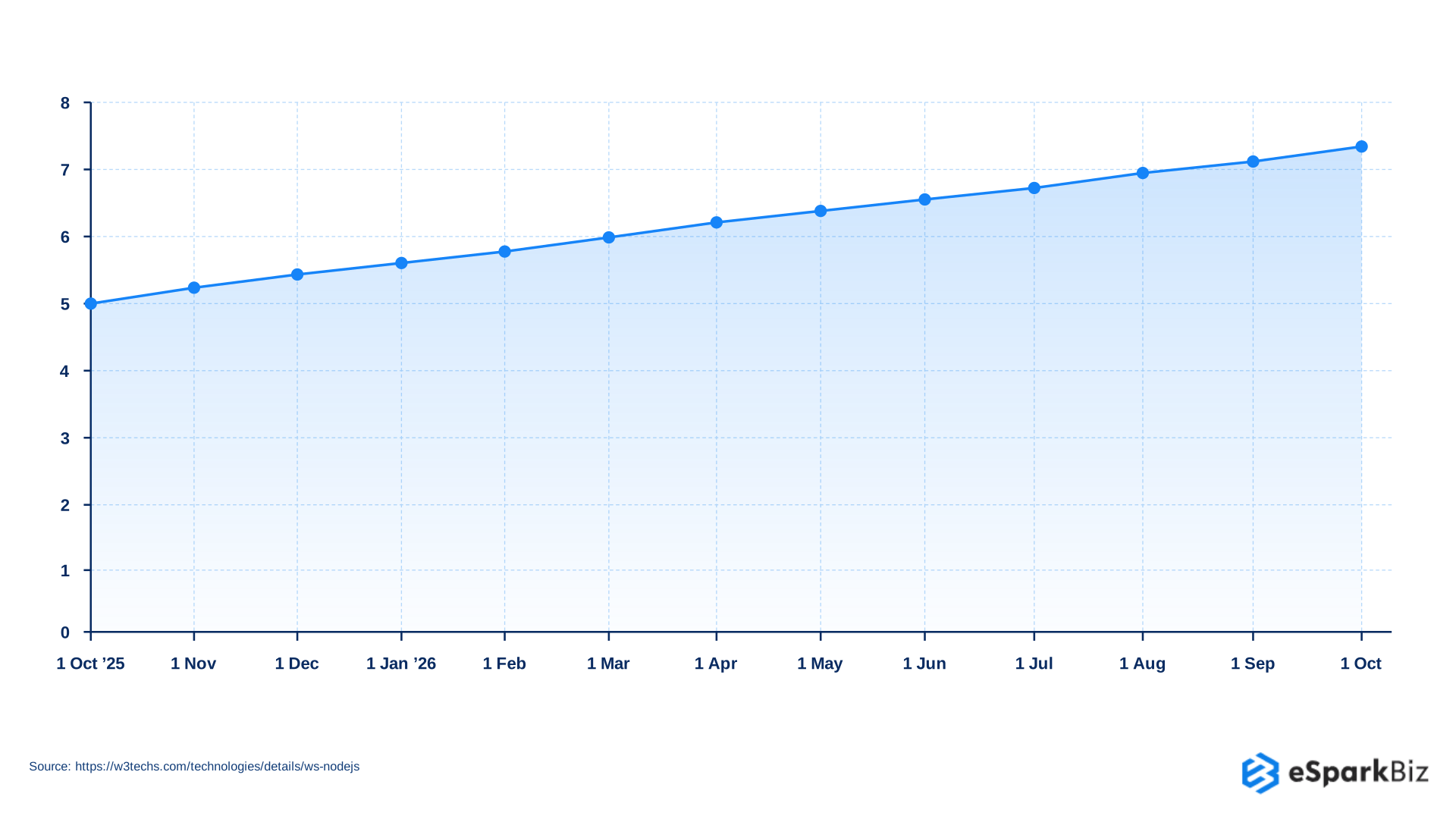
Node.js is a practical choice for the applications that need to handle many users and network request at the same time. According to W3Tech’s Node.js usage statistics, Node.js is used by 7.4% of websites whose web server technology is known.
The real challenge is organizing a Node.js application as it grows. More users, features, data and developers can create complexity. A good architecture keep business logic, APIs, databases & supporting services clearly organized.
This guide is based on establish Node.js runtime behavior, common production engineering practices and widely used application architecture patterns to explain these choice in practical terms.
How Node.js Architecture Shapes Production Applications
Node.js architecture defines how an application’s main parts are work together, including business logic, APIs, databases, external services and background tasks. A clear structure keep responsibilities separate as the application grows.
It also affects how the system handle traffic, failures, security and future changes. Well defined boundaries can make it easy to update features, manage workloads and scale parts of the system when the chosen architecture support independent scaling.
In practice, architecture influences:
- Code organization: how features and responsibilities are grouped.
- Data flow: how requests move between application layers.
- Service communication: how systems exchange information.
- Workload handling: how background & CPU heavy tasks are managed.
- Scaling and reliability: how the system responds to higher traffic and failures.
- Team development: how responsibilities and ownership can be divided across developers or teams.
The goal is not to choose the most complex architecture. It is to choose a structure that fits the application’s current needs while leaving a practical path for future growth.
Node.js Architecture Patterns: Which Approach Fits Your Application?
Node.js supports several architecture patterns and the right choice depends on application complexity, team structure, workload and scaling needs. These patterns were selected because they represent the key structural choices used in production Node.js applications.
| Architecture Pattern | Best Fit | Main Advantage |
| Layered | Clear request to data workflows | Simple separation of responsibilities |
| Modular Monolith | Growing applications | Clear boundaries without distributed system overhead |
| Clean | Complex business applications | Keeps business rules independent from technical details |
| Hexagonal | Multiple external integrations | Makes external systems easier to replace |
| Microservices | Independent teams or workloads | Allows services to be developed independently |
| Event Driven | Asynchronous workflows | Reduces direct dependencies between components |
| Serverless | Event triggered workloads | Reduces server management |
A practical architecture choice should match the application’s current needs rather than adding the complexity for future growth alone. A modular monolith can provide the clear boundaries, while microservices become useful when independent deployment, team ownership or workload isolation is must necessary.
Modular Monolith vs Microservices: When Should You Switch?
A modular monolith keeps an application in one deployable unit while separating the major business capabilities into defined modules. Microservices can take this separation further by running individual capabilities as independently deployable services.
| Consideration | Modular Monolith | Microservices |
| Deployment Model | Unified release with internally isolated modules | Independently deployable services with separate release cycles |
| Team Ownership | Shared application with defined module ownership | Autonomous teams owning individual business capabilities |
| Scaling Strategy | Scale the application as a unit | Scale individual services according to workload |
| Operational Complexity | Centralized deployment, monitoring & single deployment pipeline | Distributed infrastructure requiring stronger observability and per service pipelines |
| Failure Isolation | Module failures can affect the wider application process | Service boundaries can contain failures and reduce the blast radius |
| Data Boundaries | Shared data layer with controlled module access | Service specific data ownership with distributed consistency considerations |
| Communication | Mostly in-process module communication | Network based APIs, events or messaging between services |
Signs You Are Ready to Switch
Moving to microservices makes sense when the application has a clear need for independent deployment, service level scaling, team ownership or stronger failure isolation. If those needs have not emerged, a modular monolith can provide clear boundaries without introducing the operational overhead of distributed services.
Architecting Node.js: Lessons from Uber’s API Gateway
Uber’s Node.js API gateway demonstrates how Node.js can support high traffic systems while evolving into a distributed architecture as application scale, engineering ownership and service complexity increase.
- 800,000 requests/second handled at peak
- 40% of Uber engineers contributed code to the gateway
- 40+ independent services formed its eventual architecture
As Uber’s gateway grew, dependency, service, testing and versioning challenges increased, requiring architecture & service boundaries to evolve alongside scale.
Designing a Clean Structure for Large Node.js Applications
As a Node.js application grows, clear boundaries become more important. A practical structure separates request handling, business logic, data access and external integrations.
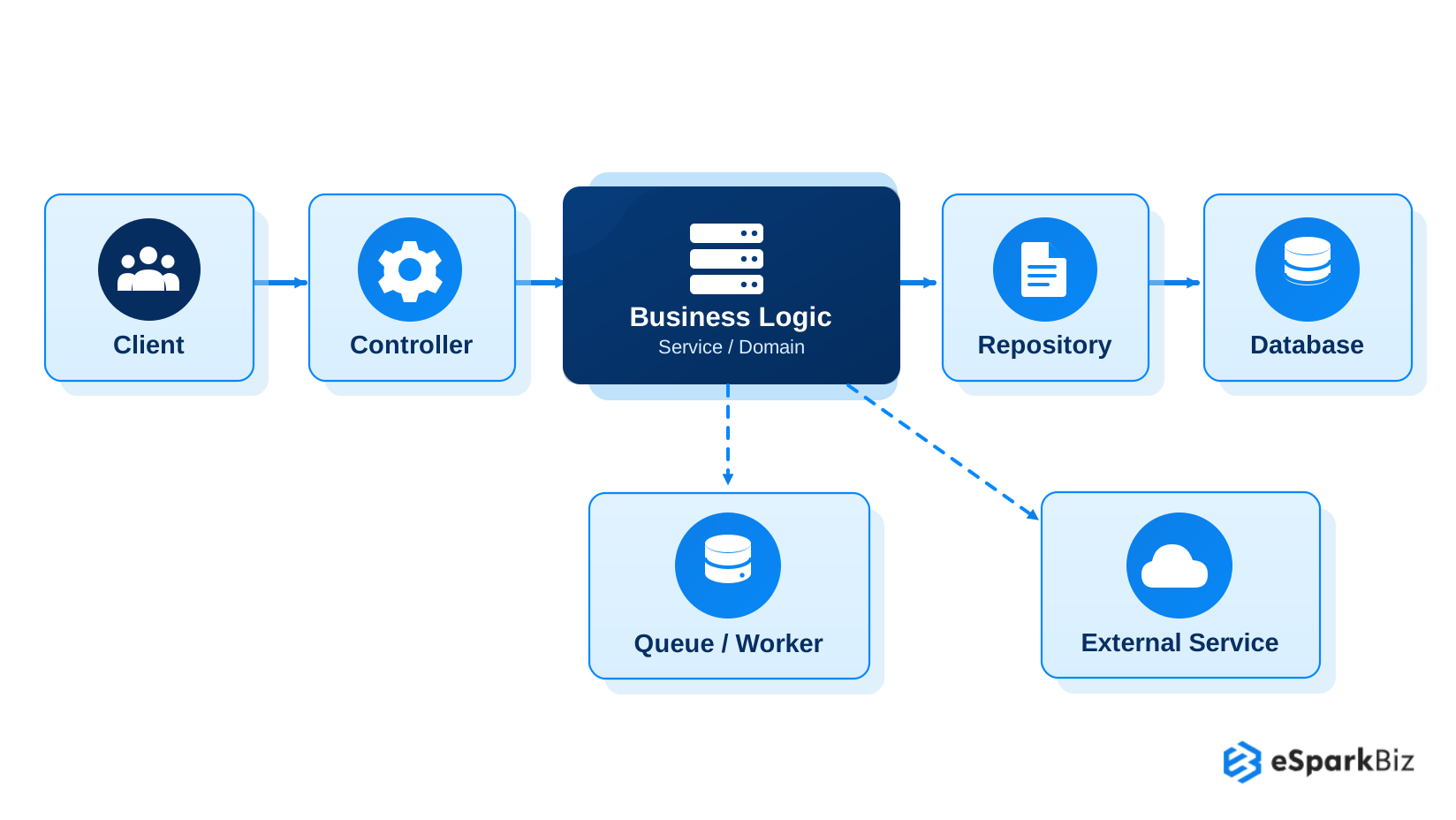
A feature based structure keeps related controllers, validation, business logic and data access code together. Within each feature, layers such as controllers, services & repositories can define responsibilities clearly.
import type { Request, Response } from “express”;
// user.controller.ts
export class UserController {
constructor(private userService: UserService) {}
async getUser(req: Request, res: Response) {
const user = await this.userService.getUser(req.params.id);
if (!user) {
return res.status(404).json({ error: “User not found” });
}
return res.json(user);
}
}
// user.service.ts
export class UserService {
constructor(private userRepository: UserRepository) {}
async getUser(id: string) {
return this.userRepository.findById(id);
}
}
// user.repository.ts
export class UserRepository {
async findById(id: string) {
return db.user.findUnique({ where: { id } });
}
}
In this structure, the controller handles the HTTP request, the service contains application logic and the repository manages database access. Keeping these responsibilities separate makes individual components easier to test, replace & maintain.
Node.js Runtime Architecture: Event Loop, V8 and libuv
Node.js uses several runtime components together to process the requests efficiently. V8 executes JavaScript, the Event Loop coordinates asynchronous operation and libuv provides the mechanisms that support the non blocking I/O.
The runtime can be understood through four key components:
- V8 Engine: It executes JavaScript code and manage memory through its garbage collector.
- Event Loop: Coordinates callbacks and asynchronous operations so Node.js can continue processing other work.
- libuv: Provides the underlying event driven I/O layer and manages operations such as networking & file system tasks.
- Worker Threads: Provide a way to move suitable CPU intensive JavaScript work away from the main Event Loop.
A simple example shows how Node.js continues executing code while an asynchronous operation is pending:
console.log(“Request started”);
setTimeout(() => {
console.log(“Async operation completed”);
}, 0);
console.log(“Request continues”);
The output is:
Request started
Request continues
Async operation completed
This illustrates how the callback scheduled by setTimeout() runs after the current JavaScript execution completes. The Event Loop can then process the pending callback without stopping the earlier synchronous code from continuing process.
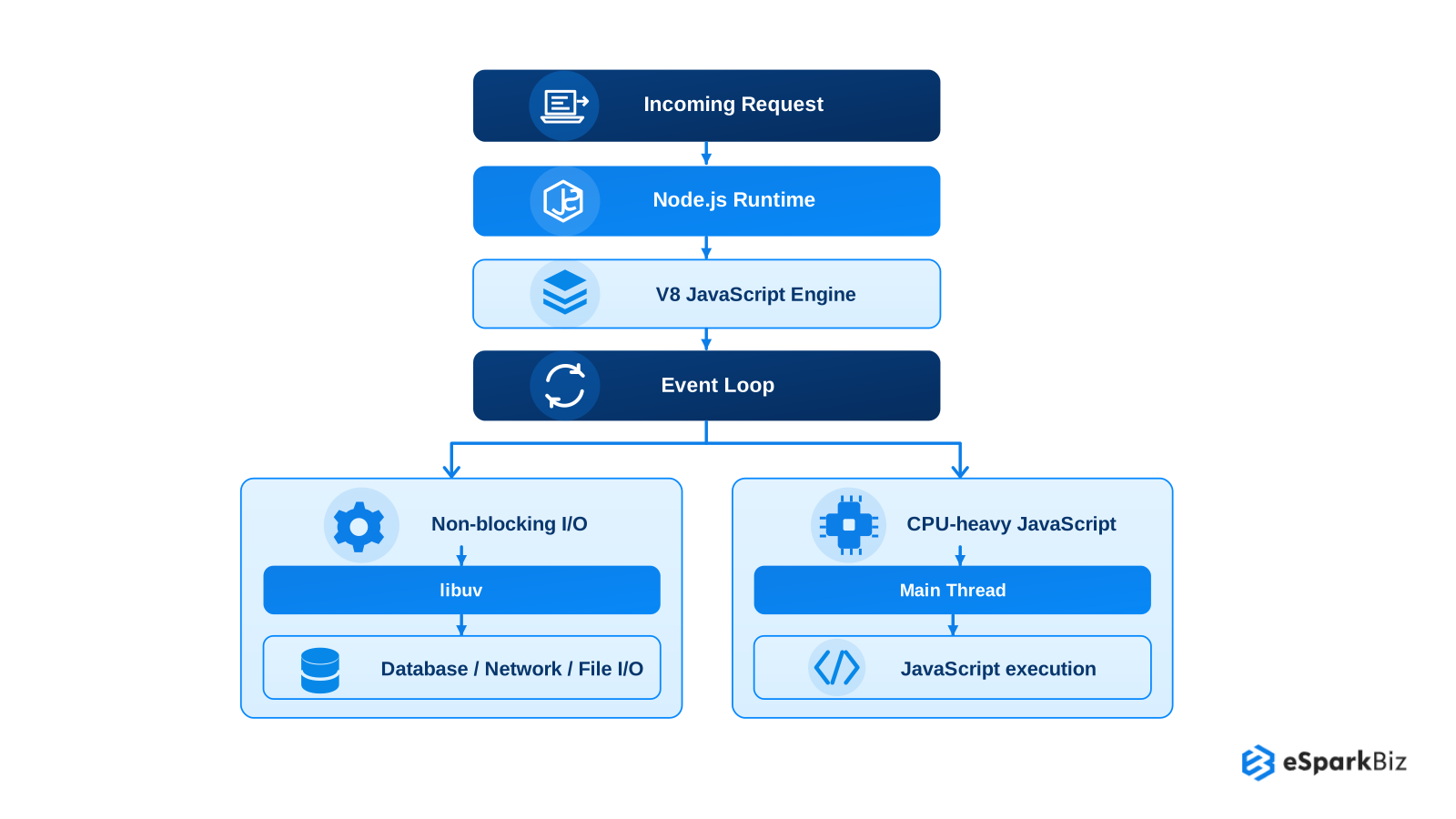
Node.js handle I/O bound work efficiently through the asynchronous processing, while CPU heavy task can block the main thread. CPU intensive workloads therefore require deliberate architectural handling.
Video Deep Dive: Node.js Mechanics Explained
To see these runtime mechanics in action, watch this explainer. It breaks down how the V8 engine, Event Loop and non blocking I/O efficiently handle thousands of concurrent server operations:
Data Flow and Async Workflows in Node.js Applications
Node.js applications often combine database operations, external APIs, caching and background jobs. Keeping these workloads separated helps prevent slow operations from unnecessarily delaying user facing requests.
A practical approach is to divide work into two paths:
- Request time operations: Tasks required to validate the request, apply business logic, retrieve data & return a response.
- Background operations: Tasks that can run after the response, such as email processing, notifications, report generation, file processing or other queued jobs.
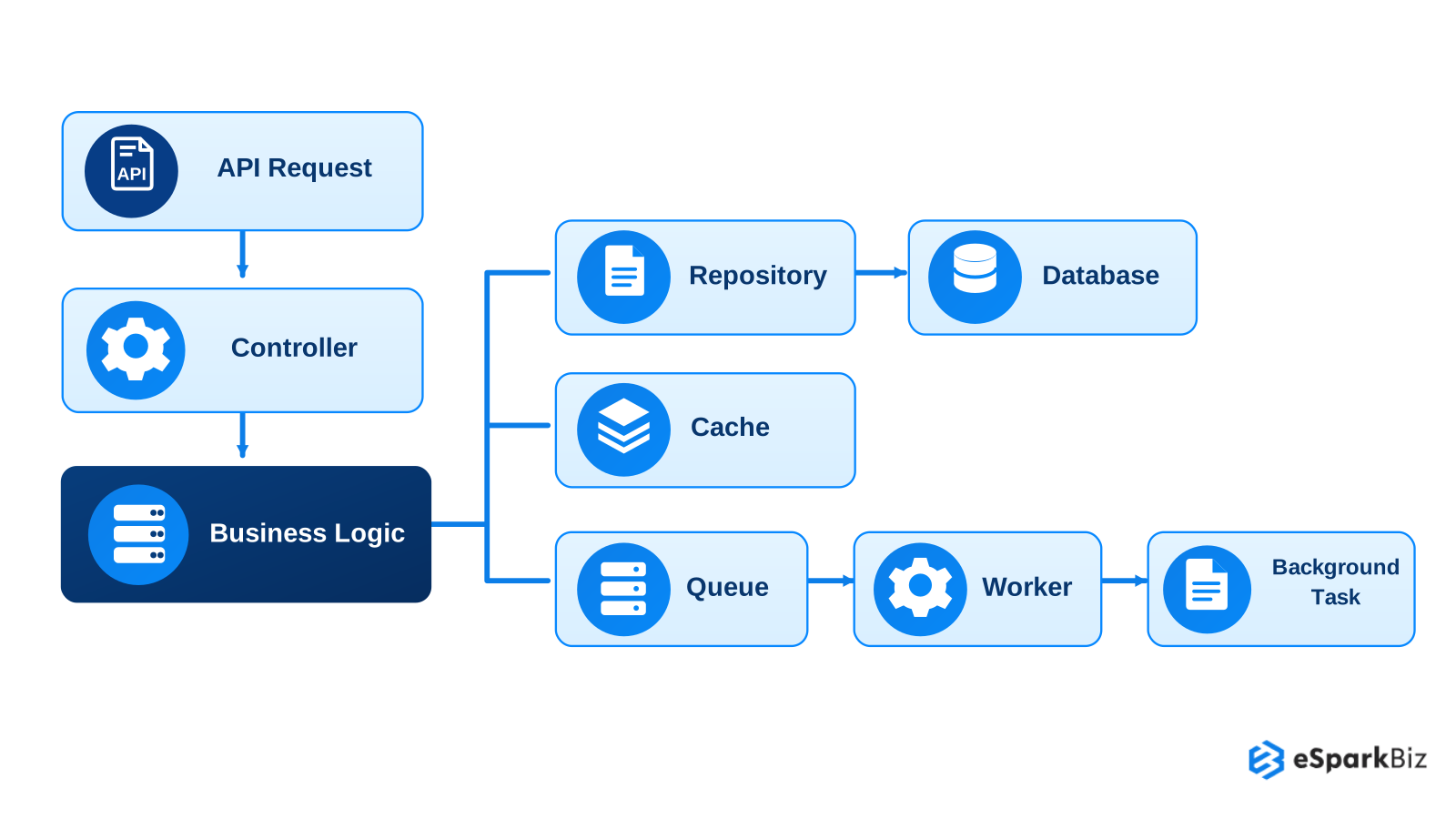
Queues and workers are particularly useful when processing can happen independently of the user’s request. This keeps the API path focused on work that needs an immediate response while background processing handles slower or asynchronous tasks.
The architectural goal is to keep data access, request processing & asynchronous workloads clearly separated rather than placing every operation inside the request response cycle.
Handling CPU Intensive Workloads Without Blocking Node.js
Node.js is well suited to I/O heavy applications, but CPU intensive operations can occupy the main thread and delay other requests. Architecture should therefore separate heavy computation from normal request processing.
Common approaches include:
- Worker Threads: Move CPU intensive JavaScript calculations away from the main Event Loop.
- Background Workers: Process heavy or delayed jobs outside the API request path.
- Queues: Buffer workloads & allow workers to process them independently.
- Separate Services: Move consistently heavy workloads into dedicated services when they have different resource requirements.
The goal is not to move every heavy task into a separate service. The appropriate approach depends on workload type, execution time, traffic & resource requirements.
Did You Know?
Node.js Long Term Support (LTS) releases receive 30 months of support, making Node.js version planning an important part of maintaining production architecture.
Scaling Node.js Applications: From One Process to Distributed Systems
As traffic increases, Node.js applications need additional capacity without creating unnecessary architectural complexity. Scaling can happen at the application, process or service level.
- Horizontal scaling: Run multiple Node.js instances behind a load balancer.
- Process scaling: Run one Node.js process per CPU core, using the cluster module, a process manager or one container per core.
- Container orchestration: Platforms such as Kubernetes can manage replicas, restarts & workload placement.
- Service level scaling: Scale individual services when their workloads are differ.
- Stateless design: Keep share state outside individual instances so requests can move between them.
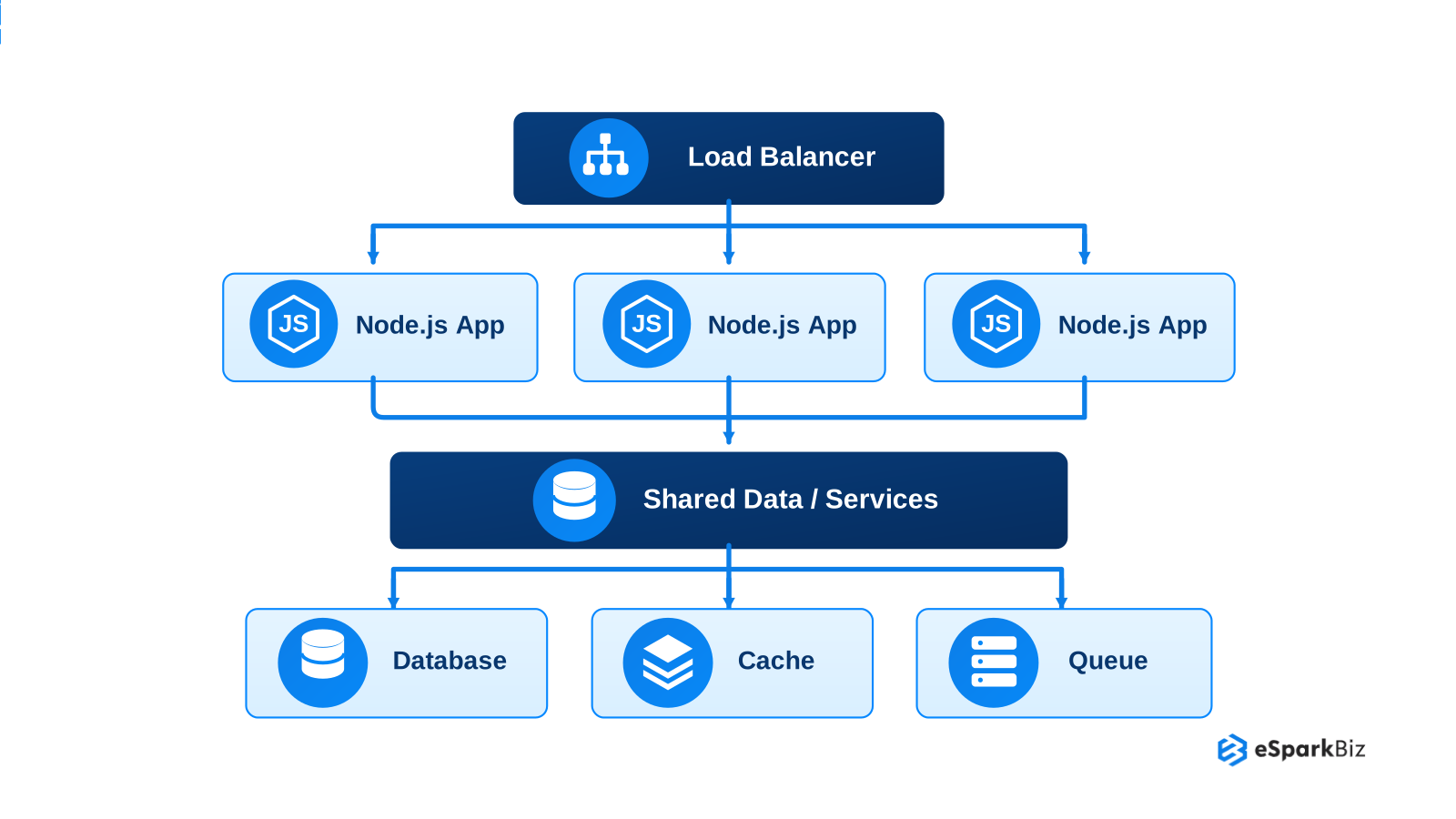
The right approach depend on traffic patterns, workload type, state management & operational requirement.
Node.js Architecture for Real Time Applications
Node.js fits real time applications where the servers need to maintain ongoing communication with connected clients. Common examples include the chat applications, live notifications, collaboration tools and real time dashboard.
Key architectural considerations include:
- WebSockets: Maintain persistent, two way communication between clients and the server.
- Event driven processing: Handle incoming events without unnecessarily blocking other application work.
- Connection management: Account for active connections, reconnects, timeouts & disconnections.
- Horizontal scaling: Support multiple Node.js instances when connection volume increases.
- Message distribution: Use a share messaging layer when the events need to reach clients connected to different application instances.
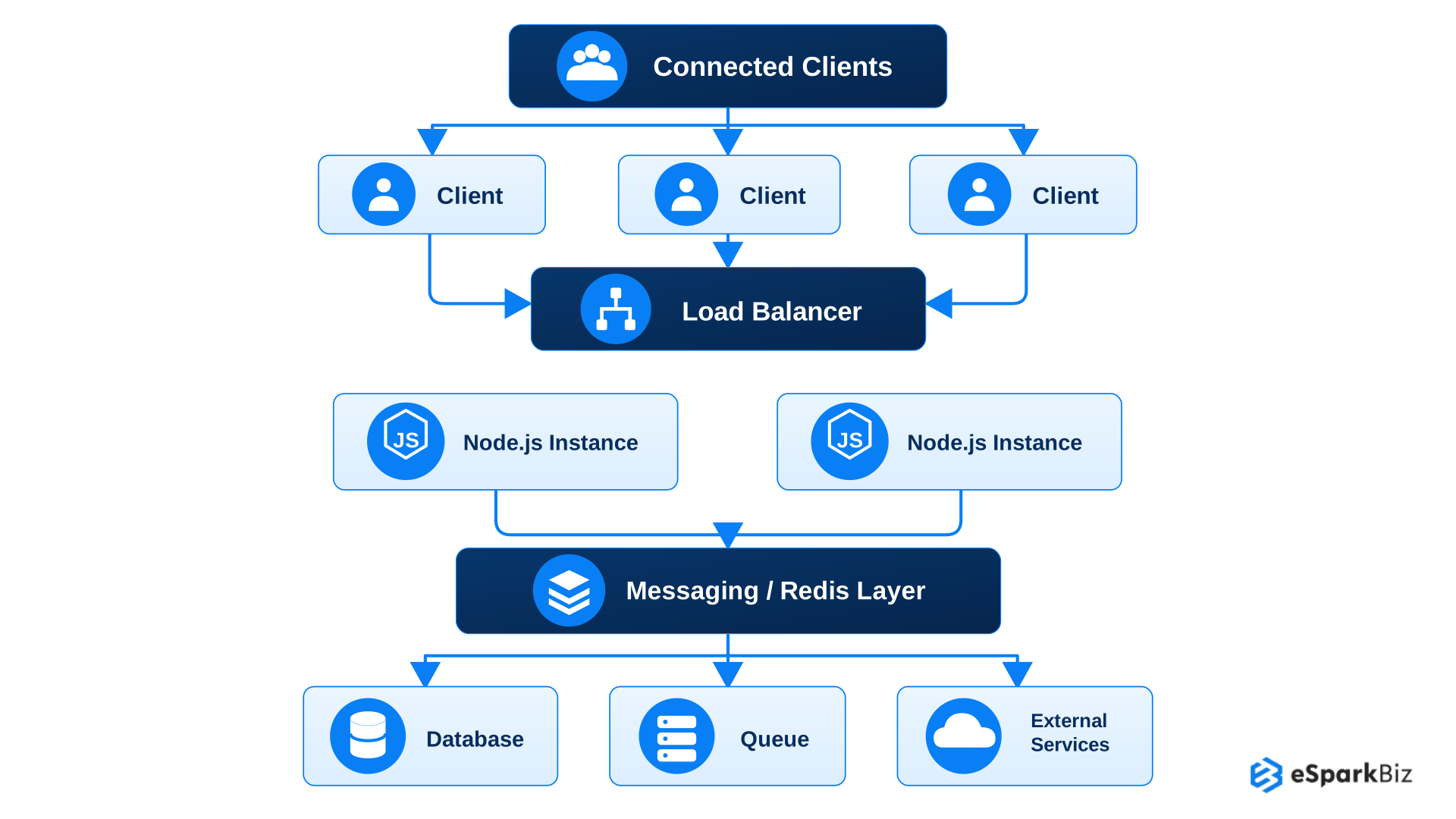
For real time systems, architecture should account for connection volume, message frequency, shared state and failure recovery, rather than focus only on the HTTP request traffic.
Node.js Architecture Mistakes That Create Production Problems
A Node.js architecture can work well during the development but also create problems under production traffic. Most issues are occur when workloads, service boundaries or infrastructure are not designed for the actual application demands.
Common problems include:
- Event Loop blocking: CPU heavy calculations or synchronous operations can delay other requests.
- Poor service boundaries: Splitting services around technical components can create unnecessary communication & coordination.
- Excessive microservices: Too many small service increase deployment, monitoring, networking and debugging overhead.
- Data and queue constraints: Slow queries, shared databases or poor managed queues can limit performance even after scaling application instances.
- Weak failure handling: Missing timeout, appropriate retries, health checks or graceful shutdown can also allow to individual failures to affect wider systems.
Identifying these risks during architecture planning helps prevent production issues later.
Community Insights
Node.js developers on Reddit highlight the importance of the maintainable code, careful dependency selection & avoiding unnecessary complexity. They also stress that security and performance require the deliberate architectural decisions.
Choosing the Right Node.js Architecture for Your Application
There is no single Node.js architecture that fit every application. The right choice depend on the system’s complexity, workload, team structure and operational requirements.
| Consideration | What to Evaluate | Possible Direction |
| Team Size | Developer count and ownership needs | Modular monolith → Microservices |
| Traffic | Request volume & traffic patterns | Horizontal scaling |
| Workload | I/O heavy vs CPU intensive processing | Async I/O → Workers |
| Complexity | Business rules and dependencies | Layered → Clean/Hexagonal |
| Deployment | Need for independent releases | Unified → Independent services |
| Scaling | Different resource requirements | Application → Service level scaling |
| Operations | Infrastructure & monitoring maturity | Simple → Distributed architecture |
Start with current requirement rather than future assumptions. Choose the simplest structure that solve today’s problems while providing a practical path for growth
Hiring a Node.js Architect: Costs and Key Considerations
Consider hiring a Node.js architect when growing traffic, complex integrations, or slow deployments make backend changes difficult. Before signing with an external team, evaluate:
- Technical expertise: Experience with performance optimization, database design, security, and migration planning.
- Architecture review costs: A focused review may cost $10,000 – $25,000, while a mid-size SaaS monolith to microservices migration may cost $150,000 – $500,000, depending on system complexity and project scope.
- In-house vs external support: An experienced internal team can lead the redesign. Otherwise, a development partner can assess your system, prioritize improvements and guide the initial phase.
Start with a defined architecture review, including deliverables, timelines, and estimated costs, before committing to a full migration.
How eSparkBiz’s Learning Ecosystem Lifted Engagement by 45%
eSparkBiz built a Node.js powered learning platform that unites courses, mentorship, events, community chat, and progress tracking for students, parents, mentors, and educators, keeping learners active throughout personal growth programmes.
- 45% increase in user engagement across the platform
- 30% faster course navigation after restructuring content flow
- 25% growth in mentor-student interaction
- 95% positive user experience feedback after launch
From Architecture Planning to Production: eSparkBiz’s Approach
Choosing a Node.js architecture is only the first step. Business also need to translate design decision into reliable APIs, maintainable backend components, tested integrations & production ready systems.
eSparkBiz offers Node.js development services across several areas relevant to these challenges:
- Backend & API Development: Build application backends and RESTful or GraphQL APIs around project requirements.
- Microservices Architecture: Structure selected business capabilities as independently deployable services when the application requires them.
- Real Time Applications: Develop WebSocket based functionality for chat, notifications and applications that need ongoing client server communication.
- Architecture Review and Performance Optimization: Assess existing architecture, identify performance issues, and recommend targeted improvements to handle growing traffic without a full rewrite.
Its process includes architecture diagrams, database schemas, API specifications, automated testing, security validation, and performance testing. US based teams can discuss collaboration arrangements, time-zone overlap, and contract terms before engagement.
Frequently Asked Questions
Which Node.js architecture is best for a growing SaaS application?
A modular monolith is often a practical starting point because it keeps business areas separated without the operational complexity of the multiple services. Microservices can be introduced when the independent scaling, deployment or team ownership becomes necessary.
When should a Node.js application use a modular monolith instead of microservices?
Use a modular monolith when the application can operate as one deployment while maintaining clear internal boundary. Microservices become more suitable when the independent deployment, scaling, ownership or failure isolation become necessary.
How can I modernize an existing Node.js architecture without rewriting the entire application?
Modernization can happen incrementally by separating business modules, improving data access boundaries, moving from background work to queues & extracting services only where there is a clear technical or the business need.
What architecture should I use for a high traffic Node.js application?
A high traffic application can benefit from stateless Node.js instance behind a load balancer, efficient database access, caching where appropriate, asynchronous processing & horizontal scaling based on actual workload requirement.
How do I decide between Clean, Hexagonal and layered architecture in Node.js?
Layer architecture suit straightforward applications with clear request to data flows. Clean Architecture fit applications with complex business rules, while Hexagonal Architecture is useful when external system need to remain replaceable.
How should Node.js handle CPU intensive workloads without blocking API requests?
CPU intensive work should be kept away from the main Event Loop when it could delay for the incoming requests. Worker Threads, background workers, queues or separate services can process these workloads independently.


 August 19, 2026