

The right IT outsourcing strategy can deliver capability and speed until control slips, security gaps open and your costs start to add ups. Here is what you will get to know by this guide:
- Key pros and cons of IT outsourcing
- Security and control risks
- Costs, speed and talent access
- A practical framework for deciding if outsourcing fits to your business
Technology now touches nearly every part of the business while the technology talent gap is making specialized skills harder to find. That is keeping IT outsourcing firmly on the strategic agenda.
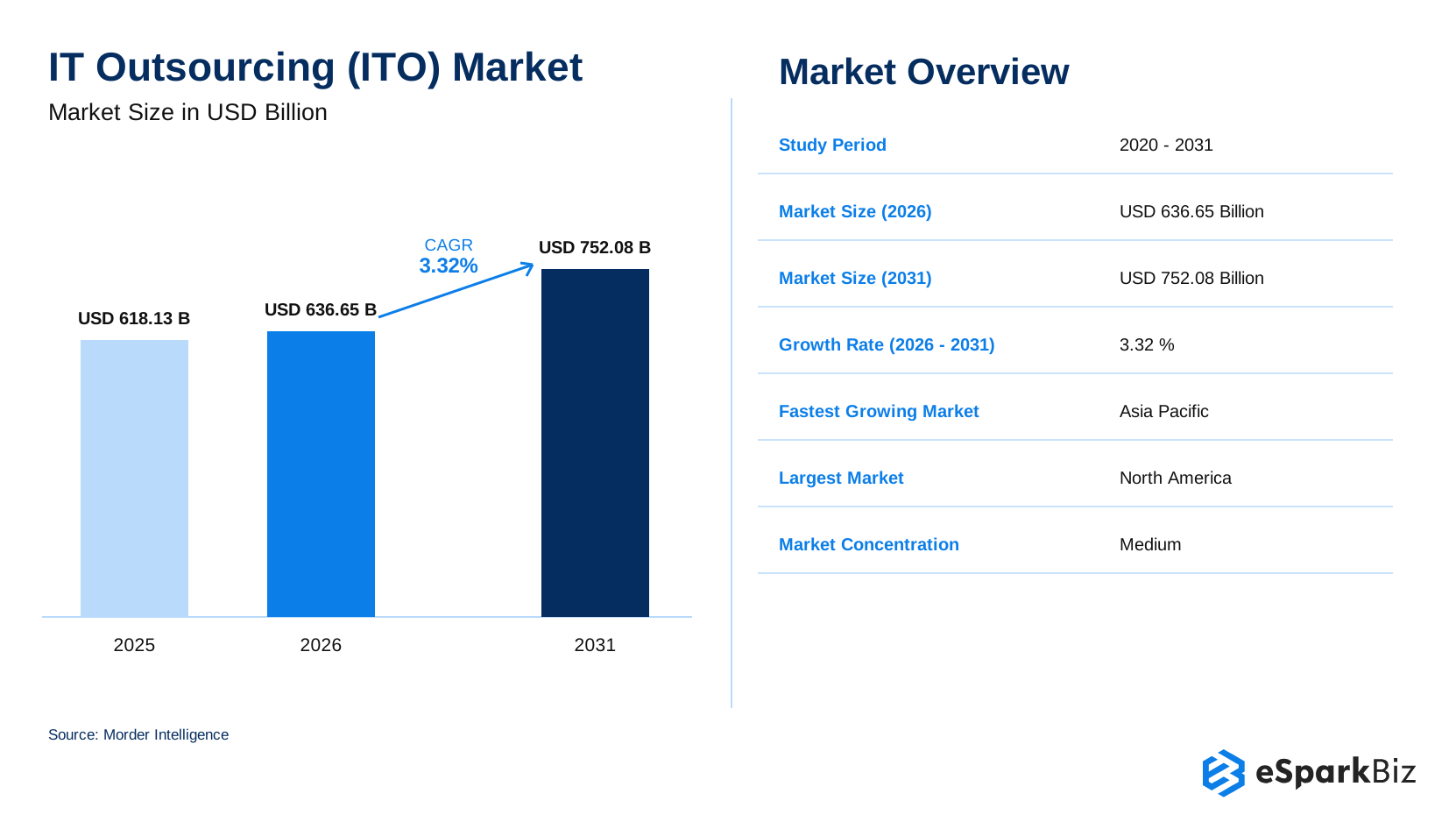
The market reflects that momentum: IT outsourcing is projected to reach US $638.65 billion in 2026 and US $752.08 billion by 2031 growing at a 3.32% CAGR. Asia Pacific is the fastest growing market, while North America remains the largest.
What IT Services Can Businesses Outsource?
Not every technology capability needs to live under your own roof. IT Outsourcing allows organizations to hand over selected IT functions, projects or ongoing services to a third party technology provider, while keeping internal teams focused on core priorities.
Depending on the business need outsourced IT work can include:
- Software development and application maintenance
- Cloud and infrastructure management
- Cybersecurity and technical support
- Data, testing and specialized IT services
The scope can be narrow or broad from one technical function to a significant part of the technology operation based on business goals, required expertise and the level of control the organization wants to maintain.
Leadership Viewpoint
The other part of outsourcing is this: it simply says where the work can be done outside better than it can be done inside, we should do it.
What Are the Key Pros of IT Outsourcing?
Organizations outsource IT for more than lower costs. The real benefits include access to specialized expertise, greater delivery capacity, and technology operations that are easier to scale. However, these benefits depend on choosing the right scope, provider, and engagement model.
1. Cost Predictability Not Just Cost Savings
IT outsourcing is not always about paying less. A well structured outsourcing agreement can make technology spending more predictable by matching costs to defined services, resources or project outcomes.
- Reduce the need for permanent in-house capacity for temporary or specialized work.
- Use defined pricing models to improve budget planning.
- Scale external resources based on changing business requirements.
Cost Reality Check
The lowest hourly rate does not always create the greatest business value. Technology leaders should evaluate the complete cost picture including transition effort, governance requirements, quality impact and long term scalability before measuring outsourcing success.
2. Access to Specialized Technology Talent
Some technology capabilities are difficult to build internally especially when demand for specialized skills is high. IT outsourcing can help organizations access trusted Nearshore outsourcing partner without requiring them to recruit for every capability themselves.
- Access specialists in cloud, cybersecurity, software development, data and legacy systems.
- Add expertise for specific projects without creating permanent positions.
- Bring in capabilities that may be difficult or time consuming to develop internally.
3. Faster Delivery and Flexible Scaling
When technology priorities change quickly, building an internal team for every new requirement is a bit of a slow process. An established provider can give organizations additional capacity when and where it is needed.
- Start projects without waiting for lengthy internal hiring cycles.
- Scale technical resources as workloads and priorities change.
- Adjust capacity without reorganizing the entire internal technology organization.
4. More Focus on Strategic Priorities
Internal technology teams have finite time. Outsourcing selected IT responsibilities can allow them to spend more of that time on initiatives that directly support products, customers, growth and business transformation.
- Shift routine or specialized work away from core internal teams.
- Give technology leaders more time to focus on strategy, innovation and transformation.
- Keep internal expertise focused on capabilities that matter most to the business.
5. Broader Security and IT Expertise
Access to specialized expertise is another reason for organizations to outsource IT services. External providers may bring dedicated security, infrastructure, cloud or compliance professionals that can be difficult to maintain internally.
- Access specialized talents without building every single capability in-house.
- Strengthen internal teams with experienced technical experts.
- Support security and IT operations where internal resources are limited.
The upside depends on what you are willing to hand over. These benefits can lose their value when an outsourced function is not properly managed.
What Do People on Quora Say?
In a Quora discussion on IT outsourcing, Victoria Polyarush highlights some practical benefits of IT outsourcing:
- Higher efficiency through specialized expertise
- Lower infrastructure investment
- Access to skilled talent without extensive hiring and training
- Time zone allowance for extended operations
- Faster delivery of services and projects
What Are the Key Cons of IT Outsourcing?
Working with an external provider also means sharing responsibility for part of your technology operations. This can affect visibility, decision making and accountability, particularly when the outsourced function is critical to the business.
1. Less Direct Control Over IT Operations
When an external provider takes responsibility for part of your technology environment, internal leaders naturally have less daily control over how the work gets done.
- You may have less visibility into staffing, processes, priorities, and technical decisions.
- Changes may require more coordination with the provider rather than immediate internal action.
- Unclear responsibilities can create gaps in ownership when issues arise.
The solution is not to manage every task but to establish clear service levels, reporting, escalation paths, decision rights, and accountability from the start.
2. Greater Third-party Security Risk
Outsourcing can expand your technology footprint outside your organizational perimeter. This introduces an additional layer of third-party risk, especially where access to sensitive systems, data, or infrastructure is involved.
- Assess the provider’s security controls before granting access.
- Define data protection, access management, monitoring, and incident response requirements.
- Review security performance throughout the relationship, not just during onboarding.
A trusted provider should strengthen your security posture rather than become a blind spot.
3. Communication and Coordination Can Get Harder
Distance, different working hours, unclear ownership, and inconsistent communication can slow down every decision. The risk increases when multiple internal teams and external providers are aligned with the same systems or project.
- Assign one clear ownership for major decisions and escalations.
- Set clear communication routines, documentation standards, and response expectations.
- Define responsibilities clearly so issues do not get lost between internal and external teams.
The strongest outsourcing relationships feel like an extension of the internal team rather than a separate part of the organization.
4. Vendor Dependency and Lock In
The longer a vendor works on a critical system or project, the harder it becomes to explain that work to another provider. This is known as vendor lock-in and it will affect your negotiation position, raise migration costs, and reduce flexibility.
- Maintain ownership of critical data, documentation, code, and intellectual property where appropriate.
- Avoid contracts that make it unnecessarily difficult to switch to another provider.
- Include clear exit, knowledge transfer, and data return provisions.
Outsourcing should provide your organization with greater flexibility rather than leaving you dependent on a single provider.
5. Hidden Costs and Scope Creep
The quoted price is only a single part of the outsourcing cost. Changes in requirement or priorities, integration work, and vendor management all may add to the final bill especially when the original scope leaves room for interpretation.
- Define exactly what is included, excluded and chargeable.
- Establish a clear process for handling scope changes.
- Review the total cost of ownership rather than comparing headline rates only.
Some outsourcing risks are unavoidable. The priority is to identify them early, assign accountability and address them in the contract before they become a problem.
The key is not to avoid every outsourcing risk but to identify the risks that matter most and put the right safeguards in place before work begins.
Here is a quick way to weigh the potential benefits against the risks and actions required:
| What You Gain | What to Watch For | What to Do |
| Specialized talent | Provider dependency | Retain documentation and IP ownership |
| Faster delivery | Quality gaps | Track performance through SLAs |
| Flexible capacity | Limited visibility | Set reporting and escalation rules |
| Strategic focus | Third party security risk | Review security controls regularly |
Common IT Outsourcing Mistakes to Avoid
- No SLA baseline: Agree on measurable response times, uptime targets, and resolution expectations before signing.
- Vague scope: Define deliverables, exclusions, responsibilities, and extra charges clearly.
- No exit plan: Require documentation, knowledge transfer, data return, and transition support in the contract.
- No access reviews: Apply least-privilege permissions and review provider access regularly.
- Weak vendor evaluation: Check relevant experience, client references, security evidence, and the provider’s capacity to meet your needs.
Before choosing a provider: Confirm that its capabilities, service commitments, security controls and exit terms match your business requirements.
How IT Outsourcing Costs Affect Its Pros and Cons
IT outsourcing costs depend on the contract, scope and level of support. While outsourcing can provide access to expertise without hiring a full team, management, onboarding, and transition costs can reduce the savings.
| Cost factor | Potential benefit | Potential drawback |
| Provider fees | Predictable costs under a clear contract | Extra charges for scope changes |
| Recruitment | Less direct hiring effort | Provider selection takes time |
| Management | Shared delivery responsibilities | Requires ongoing oversight |
| Tools and infrastructure | May be included in the service | Additional charges may apply |
| Transition and exit | Easier handover when planned | Switching providers can be costly |
Before signing: Compare the full cost of outsourcing with your alternatives, including management time, onboarding, change requests and exit expenses.
IT Outsourcing vs. Staff Augmentation vs. Managed Services
These three models can sound interchangeable but they give you very different levels of control and responsibility. The simplest distinction is who manages the work, your team, a dedicated external team, or the provider itself.
| Model | Who manages the work? | Cost structure | Typical use case | Control retained |
| IT Outsourcing | Provider manages defined work or outcomes | Project, fixed scope, or service-based | Outsourcing a function, project, or specific IT capability | Moderate |
| Staff Augmentation | Your internal team manages external staff | Usually hourly or resource-based | Filling skill or capacity gaps | High |
| Managed Services | Provider manages the ongoing IT function | Recurring service fee, often tied to SLAs | Ongoing infrastructure, security, support or operations | Lower |
How These Models Differ
With Staff Augmentation, you bring external professionals into your existing team while keeping day to day management in-house.
With IT outsourcing, you hand over responsibility for specific work, deliverables or outcomes to an external provider. A dedicated team may be involved but the scope and management approach will depend on the agreement.
With managed services, the provider takes ongoing responsibility for running a defined IT function usually based on agreed service levels and performance metrics.
In short, choose staff augmentation when you want people, outsourcing when you need for specific outcomes and managed services when you require an IT function to be continuously managed.
🎥 Watch: Should You Insource or Outsource Your IT?
Choosing between internal teams and external providers may impact on cost, control, security, compliance and access to experts. This video explains the key differences between insourcing, outsourcing, and hybrid IT models.
Useful for: Understanding the practical considerations before selecting an IT delivery model.
Security Risk in IT Outsourcing: A Governance Perspective
IT outsourcing can introduce additional third party security risks but it does not automatically make IT less secure. Much depends on the provider’s level of access, security practices and how closely the organization manages the vendor.
The Risk: Giving a Third Party Access
One of the biggest concerns is privileged access. An outsourcing vendor may need access to applications, infrastructure, credentials, or other sensitive business data to perform their responsibilities.
What May Go Wrong?
- Too much access may grant the provider more access to systems or data than is really needed.
- Poor identity and access controls can make compromised credentials harder to hold.
- A security weakness inside the organization or the supplier chain may be risky for the organization.
- Lack of good incident coordination could slow down the process in case of an event.
How Businesses reduce Third-party Risk
Outsourcing agreements need to consider much more than just pricing and scope of work. It is necessary to clearly establish security procedures during the whole process.
- Vendor due diligence: Evaluate vendor security measures, certifications, policies, and any pertinent audit evidence prior to using the vendor.
- Access controls: Use least privilege access, strong authentication, and regular permission reviews.
- Contractual safeguards: Clearly set out security requirements, breach notification, incident response, audit rights, and who is responsible for what.
- Ongoing oversight: Continuously monitor security performance rather than viewing the evaluation of vendors’ performance as a one time exercise.
Outsourcing does not remove security responsibility, it changes where some of the risk sits. A carefully vetted provider with strong security practices can support a secure IT strategy while a poorly managed provider can become a serious third party risk.
Fintech Security Checklist: What to Outsource First
For a 150 person fintech with a small IT team, begin with low risk, clearly defined tasks such as routine IT support, non production testing and infrastructure monitoring.
- Outsource first: Routine support and testing with masked data and limited system access.
- Restrict access: Keep payment approvals, production databases, encryption keys and critical security decisions under internal control. Enforce least privilege, MFA and access logging.
- Require evidence: Review applicable SOC 2 Type II reports, penetration test findings, remediation records and relevant PCI DSS compliance evidence.
- Protect accountability: Contractually define incident notification, audit rights, data handling and vendor exit obligations.
Before expanding access: Run a limited pilot, review security findings and confirm applicable regulatory requirements. Outsourcing does not remove the fintech’s responsibility for regulatory compliance.
Risk Alert
Third party access affects your security boundary but not your security responsibility. Define ownership, access, monitoring and responses prior to connection by a third party to your critical systems.
Outsourcing Software vs. Infrastructure vs. Cybersecurity: The Real Consideration
Not all IT services will be outsourced in the same manner. The risk reward ratio varies greatly based upon what you outsource and the importance of that service to you.
Software Development Outsourcing
- Pros: Faster time to market, access to niche technology skills and flexible team sizes without long term hiring.
- Cons: Quality of code can be varied, intellectual property may be exposed and knowledge can become concentrated with the vendor when they manage the architecture.
Infrastructure Outsourcing
- Pros: 24*7 availability, lower capital expense and access to certified platform expertise.
- Cons: Less direct control over the environment, slower incident resolution across the multiple time zones and potential vendor lock in through exclusive configurations.
Example: Fixing Poor Quality in Outsourced IT Support
When outsourced helpdesk quality drops, unclear service targets, weak ticket reviews, and delayed escalations are common issues.
- Set SLA metrics: Track first response time, resolution time, ticket backlog, and user satisfaction.
- Review tickets weekly: Check recurring issues, reopened tickets, and unresolved requests with the provider.
- Define escalation rules: Set clear thresholds for overdue tickets, critical incidents, and issues requiring internal IT involvement.
Use these measures to identify performance gaps, assign corrective actions, and review progress with the provider regularly.
Cybersecurity Outsourcing
- Pros: Continuous threat monitoring, access to specialized intelligence and compliance expertise that may not be easily available at in-house.
- Cons: Increased third party security risk, concentration of access to confidential information and accountability with your organization regardless of who handles that particular work.
Ensure that the function matches your internal capacity gap and comfort with delegated control.
Did You Know?
The U.S. IT outsourcing market remains fragmented despite having some major players. Accenture, IBM, Tata Consultancy Services, Cognizant and Infosys together account for a considerable share of market revenue while the broader market remains highly fragmented.
How Contract Structure Changes the Outsourcing Equation
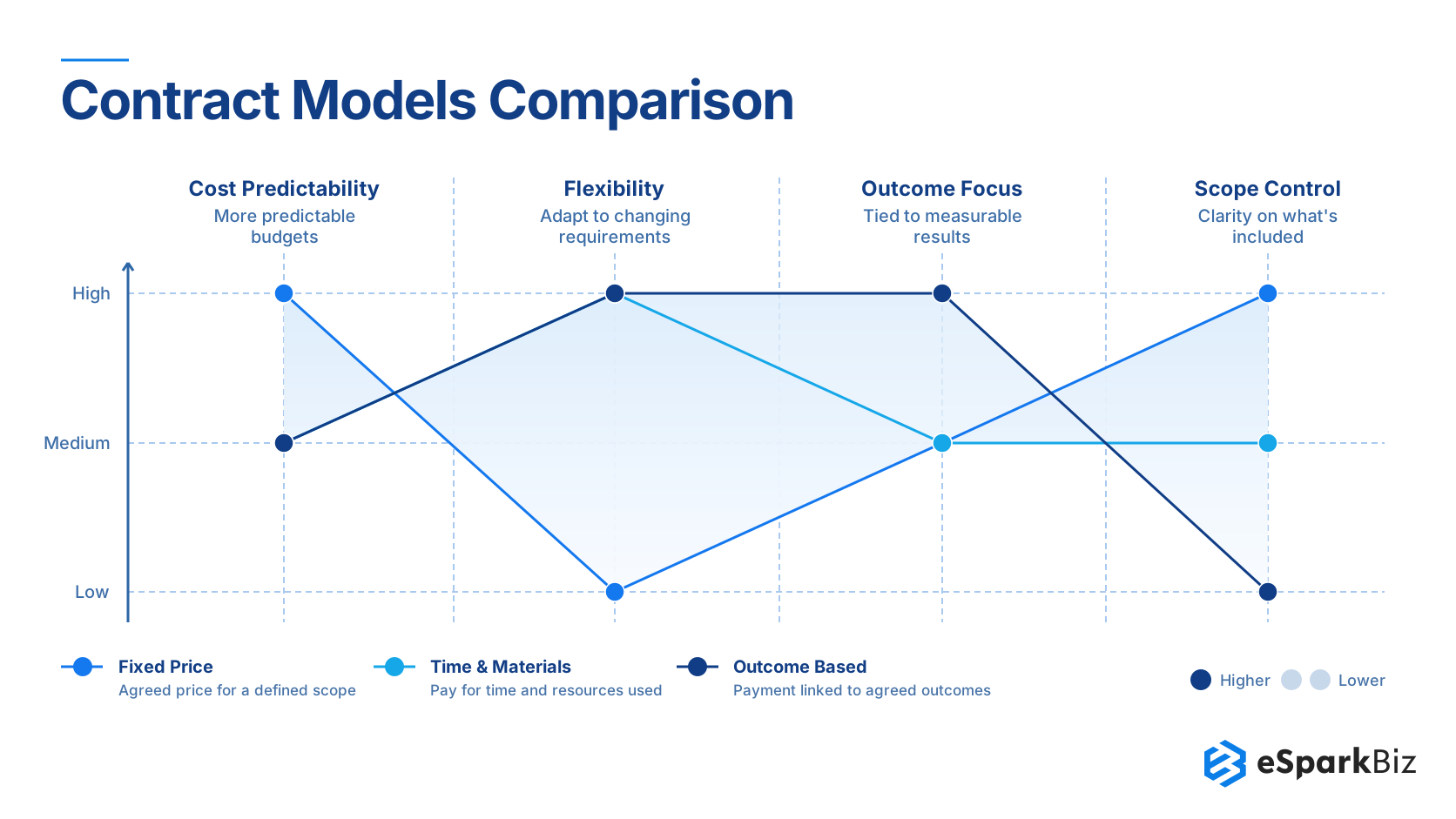
Many IT outsourcing problems are not caused by outsourcing itself, they come from choosing the wrong contract structure. Pricing, accountability, flexibility and risk can change significantly depending on whether the agreement is fixed price, time and material, or outcome-based.
| Contract Model | How It Works | Buyer Gets | Provider Takes On | Main Thing to Watch |
| Fixed Price | A set price is agreed for a specific scope of work | Better idea of total budget and cost | More risk if delivery costs go up | Changes in scope may lead to the extra charges |
| Time & Materials | You pay based on the time and used resources | More flexibility when requirements change | Lower cost risk than a fixed price contract | Costs can increase if the work takes longer or the scope changes |
| Outcome Based | Payment is based on agreed results or performance | More focus on achieving the expected results | More responsibility for delivering the results | Unclear targets or measures can cause disagreements |
Is IT Outsourcing Actually Cheaper?
IT outsourcing is not always cheaper than in-house hiring. To compare both options fairly, include salary, benefits, recruitment, provider fees, management time, tools, onboarding and transition or exit costs.
In-house teams may involve higher employment and recruitment costs, while outsourcing may introduce provider management fees, knowledge transfer expenses, and contract related costs. The better option depends on the skills required, engagement length and level of internal management.
Compare the total cost of both options over the same period rather than relying on salary or provider rates alone.
Alignment is important: Agree on what success looks like, decide who is responsible for each risk, set clear performance measures and agree on what to do if requirements will get changed.
Common IT Outsourcing Mistakes and Contract Safeguards
Companies often face outsourcing problems because they overlook responsibilities, ownership and exit terms before signing the contract.
Common mistakes to avoid:
- Vague scope: Unclear deliverables lead to delays and disputes.
- Choosing on price alone: Low rates may come with quality issues or hidden costs.
- Ignoring security: Weak access controls and unclear data responsibilities increase risk.
- Overdependence on one vendor: Missing documentation and internal knowledge make switching difficult.
- Unclear exit terms: Poor handover arrangements can delay the transition to another provider.
Vendor lock-in prevention checklist:
- Code and IP ownership: Confirm ownership and access rights for code, designs, and deliverables.
- Code escrow: Where appropriate, arrange secure release of source code if agreed trigger conditions occur.
- Documentation handover: Require current technical documentation, credentials and knowledge transfer.
- Notice period: Define how much advance notice either party must give to terminate the agreement.
- Data return and deletion: Specify how data will be returned, securely deleted, and verified at exit.
- Transition support: Agree on fees, timelines, and responsibilities for transferring work to your internal team or a new provider.
Before signing: Have legal and technical teams review the agreement together. Every exit obligation should specify who is responsible, what must be delivered, and by when.
IT Outsourcing: A Practical Example
A strong outsourcing partnership combines external expertise with a clearly defined business objective. The TCS-IBM collaboration announced is a good practical example.
- Business need: Help global organizations to accelerate cloud migration and application modernization.
- Partnership: TCS created an IBM Enterprise Cloud Architecture unit with technical people from both organizations.
- Technology focus: The solutions were developed using IBM Cloud Paks and Red Hat
- OpenShift. Scope: The partnership helped to achieve the modernization of applications, data, analytics, platforms and enterprise workloads.
- Business takeaway: From this case study, it is clear that outsourcing partnerships can combine specialist skills, technology capabilities and delivery capabilities.
Decision Framework: When IT Outsourcing Makes Sense
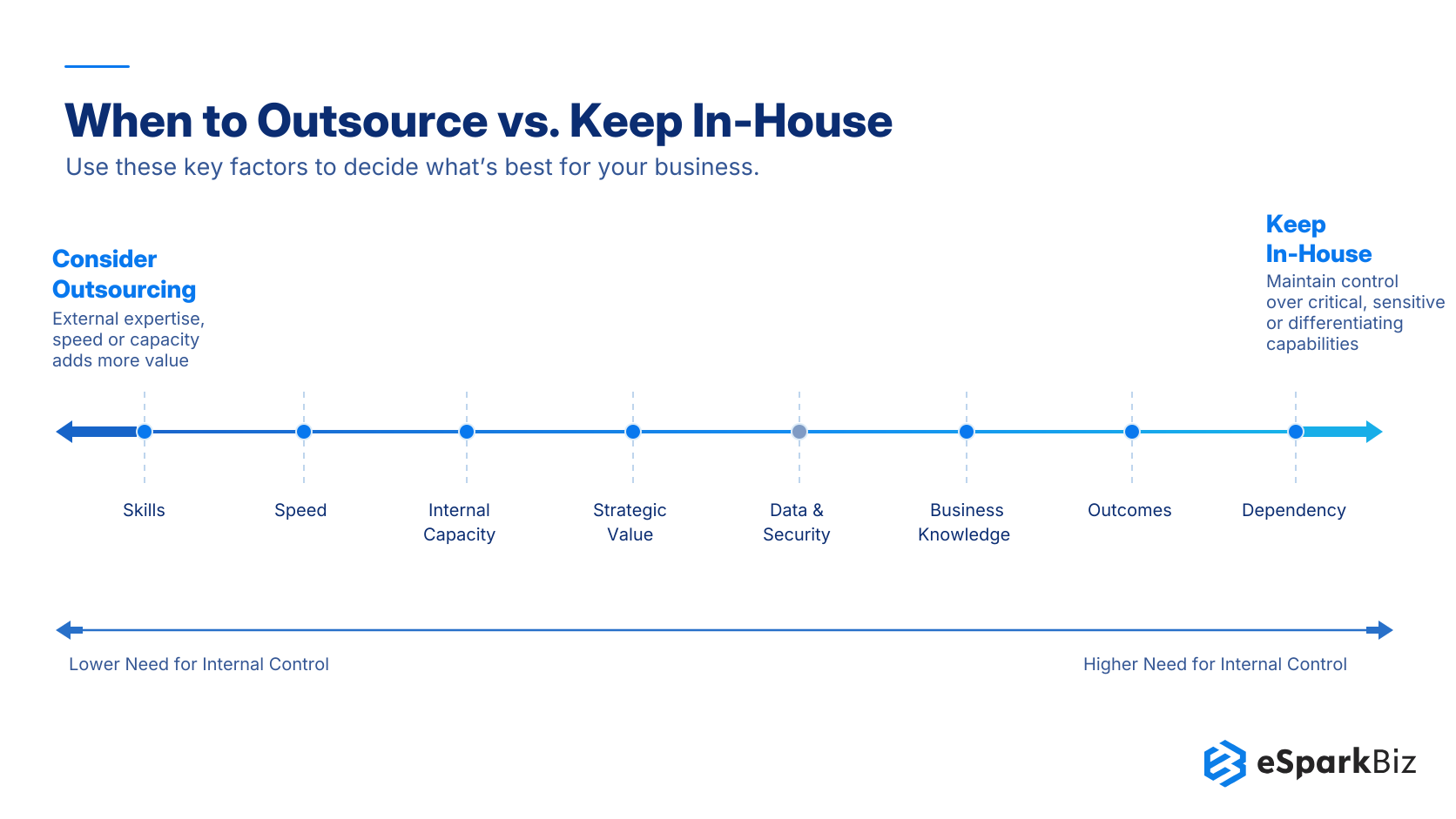
IT outsourcing makes sense when external expertise or additional capacity can meet a clear business need better than building it internally. The decision should be based on what you want to achieve, how important the function is to the business and how much control you want to keep.
| Decision Factor | Consider Outsourcing When… | Keep It In-House When… |
| Skills | You have a real skill gap or need specialized skills. | You already have the needed skills internally. |
| Speed | A project cannot wait for hiring or team expansion. | The existing team can deliver on time. |
| Internal Capacity | Your team is handling too many priorities. | You have enough capacity to handle the workload. |
| Strategic Value | The function is specialized or operational, not a key competitive advantage. | The capability directly supports your competitive advantage. |
| Data & Security | Security needs can be clearly defined and managed with the provider. | The work involves sensitive information that needs tighter internal control. |
| Business Knowledge | The work can be clearly defined without deep internal knowledge. | Success depends on specific business knowledge or context. |
| Outcomes | Responsibilities, deliverables, and success measures are clear. | Ownership and results are hard to define or measure. |
| Dependency | The provider adds value without creating too much dependency. | Outsourcing would create too much vendor lock in or dependency. |
How to Decide What to Outsource vs. Keep In-House: A 5-Step Framework
Decide what to outsource by assessing business needs, internal capabilities, security risks and expected value. Use these 5 steps to identify which IT functions to outsource and which to keep in-house.
Step 1: Identify the need. Determine whether you lack skills, internal capacity, or the time to deliver a project.
Step 2: Prioritize functions. Keep strategic, sensitive and business critical capabilities in-house. Consider outsourcing specialized or clearly defined tasks.
Step 3: Assess risks. Check the provider’s expertise, security practices, compliance and ability to protect your code and data.
Step 4: Compare values. Evaluate total cost, delivery speed, quality, management effort and vendor dependency against internal delivery.
Step 5: Start with a pilot. Define the scope, budget, timeline and success measures. Agree on an exit plan covering documentation, knowledge transfer, data return and access removal.
Rule of thumb: Outsource when external expertise adds measurable value without compromising business control or security.
Choosing an IT Outsourcing Provider: A Short Checklist
For a 200 person US company, consider outsourcing routine IT support, infrastructure monitoring, or specialized technical tasks where internal capacity is limited. Keep strategic decisions and sensitive system access under appropriate internal control.
Before selecting a provider, check that they have:
- Relevant experience: References from similar-sized businesses and industries.
- Security practices: Verifiable certifications, access controls, and incident response procedures.
- Clear SLAs: Defined response times, deliverables, reporting, and escalation rules.
- Transparent pricing: Documented fees, exclusions, and change-request costs.
- Reliable handover: Clear IP ownership, documentation, knowledge transfer, and exit terms.
Choose a provider that meets your technical, security, and business requirements, not simply the lowest price.
How eSparkBiz Supports IT Outsourcing
Choosing an IT outsourcing partner involves more than technical expertise. Businesses also need clear deliverables, security requirements, accountability, and ownership terms.
At eSparkBiz, we provide IT outsourcing and software development services based on business and project requirements. We recommend defining the project scope, delivery milestones, security responsibilities, intellectual property ownership and handover terms before work begins.
For businesses evaluating eSparkBiz, reviewing these details helps establish whether our services align with their technical needs, risk requirements, and delivery goals.
Frequently Asked Questions
What is the biggest risk of IT outsourcing?
Loss of control and third party risk are the biggest concerns. When an external vendor handles one section of your IT infrastructure, your organization may find it difficult to get visibility into systems, people, processes and security activities.
How much do IT outsourcing services cost per month compared with an in-house IT team in the US?
IT outsourcing may cost around $100 - $250 per user monthly for managed IT services, while an in-house support specialist earns a median wage of about $5,155 per month. Outsourcing prices vary by service scope and coverage while in-house costs also include benefits, tools and recruitment.
Can I outsource only part of my IT service?
Yes, Partial outsourcing can be a good practical option. A business can keep important capabilities in house, while outsourcing specific areas such as:
- Software development
- Cloud operations
- Cybersecurity
- IT support
- Infrastructure management
- Testing and maintenance
Is IT outsourcing safe?
It can be, as long as security is considered from the start.
Before outsourcing, check:
- Provider security controls
- Relevant certifications and audit reports
- Data access requirements
- Incident response procedures
- Security requirements in the contract
Security should be an ongoing responsibility, not just a one time vendor check.
Does outsourcing mean losing control of IT?
No. You can outsource the work and still keep control over important decisions.
The key is to clearly define who makes decisions, who owns the data and intellectual property, how performance is measured and when issues should be escalated.
Which IT functions are commonly outsourced?
The answer depends on the organization's priorities but common areas include:
|
Function |
Typical reason for outsourcing |
|
Software development |
Additional engineering capacity |
|
Cloud & infrastructure |
Specialized operational expertise |
|
Cybersecurity |
Security skills and coverage |
|
Technical support |
Ongoing service delivery |
|
Testing |
Specialized QA capabilities |
When should IT services stay in house?
Keep a function in house when it is closely linked to your competitive advantage, sensitive information, business knowledge or long term technology plans.
A simple rule:
If the capability is important to how your business succeeds, do not give it away easily to an outside provider.
Should we choose IT outsourcing, staff augmentation, or managed services for cloud migration, and how does each bill?
Choose IT outsourcing for a defined migration, billed by project, milestones, or time; staff augmentation for extra cloud specialists, billed hourly or monthly; and managed services for ongoing cloud operations, usually billed monthly based on service scope and SLAs.
How service level agreement (SLA) can reduce outsourcing risk?
An SLA turns expectations into measurable commitments. Depending on the service, it can define:
- Availability targets
- Time frames for response and resolution
- Performance criteria
- Escalation procedures
- Reporting requirements
- Service commitments
This gives both sides a clear way to measure whether the provider is delivering as they agreed.
How can businesses reduce IT outsourcing risks?
Use a 5 step approach:
1. Assess → 2. Vet → 3. Contract → 4. Monitor → 5. Review
Determine what needs to be outsourced, perform due diligence on the contractor, ensure that commercial and security considerations are properly addressed and manage performance.
A good outsourcing deal starts with clarity not with signing the contract directly.
How do the pros and cons of IT outsourcing differ for small businesses with no IT staff?
IT outsourcing gives small businesses access to technical support and security expertise without hiring a full IT team. However, it can reduce direct control and create vendor dependency. Start with clearly defined services, agreed response times, security requirements, system documentation and an exit plan to manage these risks.
How can a small company with no IT staff outsource IT without losing control?
Choose a provider with clear responsibilities and keep ownership of your systems, data, and accounts. Use this checklist:
- Admin access: Keep business-owned administrator accounts.
- Password vault: Store credentials in a company-controlled password manager.
- Asset documentation: Maintain an inventory of systems, licenses, and configurations.
- Monthly reports: Review tickets, security issues, system changes, and performance.
- Exit plan: Require documentation, access transfer, and knowledge handover if the contract ends.
Are IT outsourcing services suitable for small businesses?
Yes. Small businesses can outsource specific needs such as IT support, software development, cloud management, or security without hiring a full IT team. Start with a clearly defined scope and budget.

 August 14, 2026