


Your IT team can have the best strategy and still struggle when the delivery model does not fit the work. A project may need specific skills for a short time while an ongoing IT function may need more support and ownership than your internal team can handle.
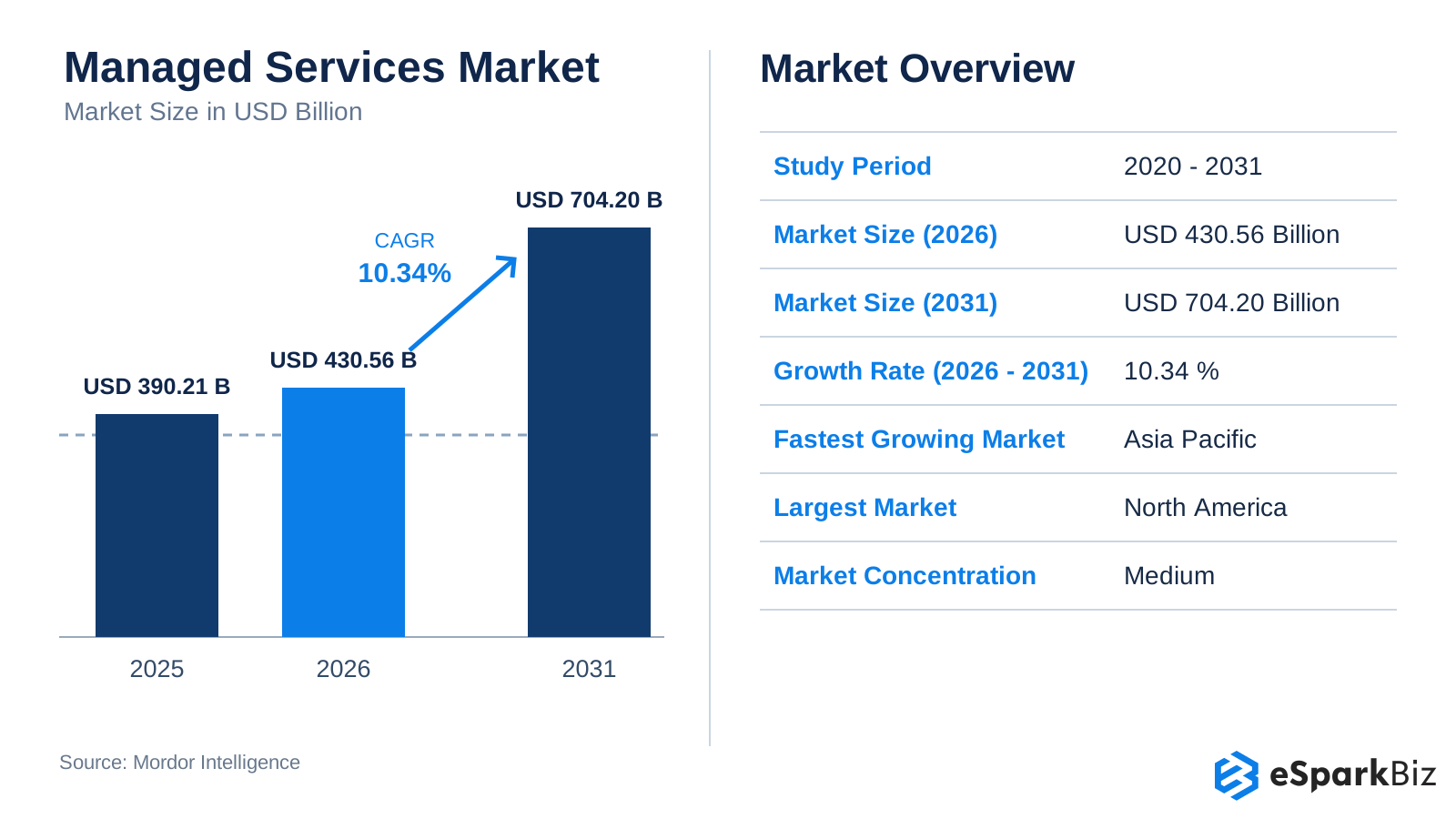
Deciding how to structure IT support is an important part of running your business. According to Mordor Intelligence, the managed services market is expected to grow to $704.20 billion by 2031, from $430.56 billion in 2026.
While this market is growing, growth alone does not decide which option is right for you. The choice between staff augmentation and managed services depends on how you want to bring in extra skills, assign responsibilities & manage the work without making things more complicated for your team.
What is IT Staff Augmentation?
Sometimes your team has the right people but not enough of them. IT staff augmentation lets you add external IT professionals to your existing team when you need specific skills or extra capacity. They work within your tools, processes, meetings and priorities while your managers continue to direct the work and make day to day decisions.
For example imagine your product team needs an experienced developer for a major release, you can bring one in without hiring a permanent employee or outsourcing the entire project. Your engineering manager still assigns tasks, reviews the work and sets priorities.
Staff augmentation can last weeks, months or longer so it is not limited to short term projects.
Pros and Cons of Staff Augmentation
Pros
- More control: Your team has more control over priorities and day to day work.
- Quick access to skills: Get specialized skills without going through the hiring process.
- More team capacity: Increase your teams capacity without adding to your regular overhead.
Cons
- Knowledge loss: You may lose project knowledge when the staff augmentation engagement ends.
- More management work: Your regular workload may require more time and effort to manage the added team members.
Did you Know?
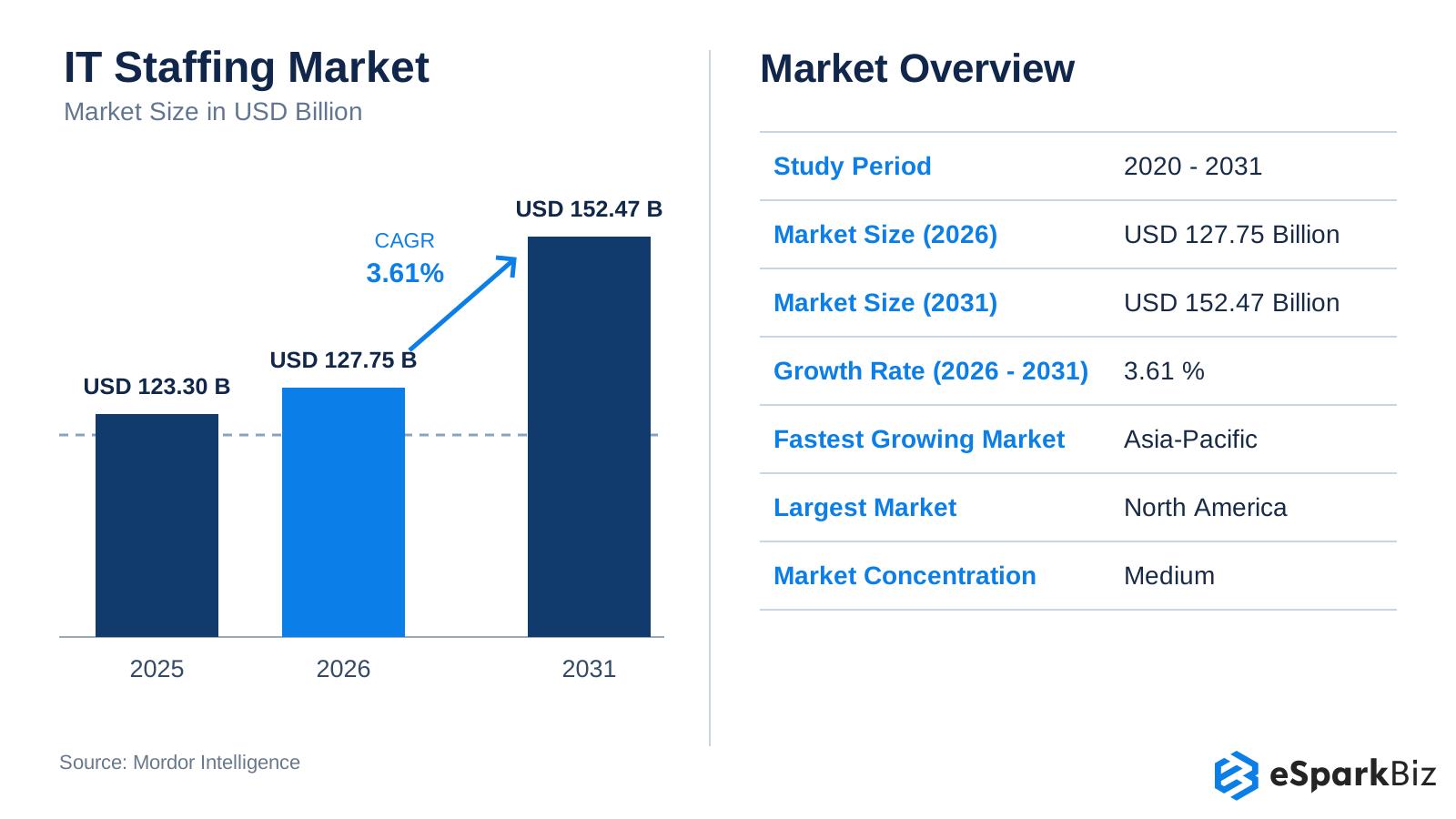
Businesses are leaning more on flexible IT talent. Mordor Intelligence estimates the global IT staffing market will reach $127.75 billion in 2026 and grow to $152.47 billion by 2031 at a 3.61% CAGR.
What is Managed Services?
With managed services your company hands a defined IT function to an external provider, which takes responsibility for running it. A managed service provider handles the daily work and follows service levels agreed in a Service Level Agreement. Your team sets the requirements while the provider decides how to deliver the service with its own people, tools and processes.
For example your IT team may spend too much time monitoring servers and dealing with routine alerts. An MSP can handle these tasks for you. Your team still stays involved when needed but does not have to manage every operational detail.
Pros and Cons of Managed Services
Pros
- Predictable costs: Contract terms make recurring IT expenses easier to budget
- SLA backed service levels: The provider works against defined performance and response commitments.
- Less day to day oversight: Your team spends less time managing routine IT operations.
Cons
- Less direct control: The provider decides how to deliver the service within the agreed scope.
- Longer onboarding: Teams need to establish access, responsibilities, processes and service requirements before work begins.
What Is Managed Capacity?
Managed capacity provides an agreed level of technical resources or team capacity over a defined period. It can help businesses secure ongoing technical support while retaining control over priorities, depending on the agreement.
For example, a 15-person engineering team may need ongoing DevOps support for deployments, CI/CD pipelines, and infrastructure improvements. Managed capacity can provide an agreed level of DevOps support while the team’s engineering leads continue to set priorities, depending on the engagement terms.
Before choosing this model, confirm the available capacity, required skills, resource availability, and responsibilities for managing and delivering the work.
What Is the Difference Between Staff Augmentation and Managed Services?
The main difference is control versus accountability. With staff augmentation, you direct the work and remain responsible for delivery. With managed services, the provider manages a defined IT function and is accountable for agreed service levels and outcomes.
| Factor | Staff Augmentation | Managed Services |
| Core focus | Skilled IT professionals added to your team | A defined IT function managed and delivered by a provider |
| Who manages the work? | Your internal managers direct tasks and priorities | The provider’s team manages day-to-day delivery |
| Level of control | High: you control tasks, priorities, and daily work | Lower: the provider controls how the service is delivered |
| Who owns the outcome? | Your organization remains responsible for delivery and business outcomes | The provider is accountable for agreed service levels and contracted outcomes |
| Pricing model | Usually hourly, daily, or monthly rates per professional | Usually fixed fees, retainers, or service-based pricing |
| Internal management load | Higher: your team guides, reviews, and manages the professionals | Lower: the provider manages the team and daily delivery |
| SLA and service levels | Usually not the main focus | Usually a key part of the service agreement |
| Best for | Skill gaps, capacity needs, and projects where you want direct control | Ongoing IT operations where you want a provider to manage delivery |
Control: Staff augmentation gives you more control over priorities and daily work, but your managers need to spend time guiding and reviewing the team.
Accountability: Managed services give the provider responsibility for agreed service levels and delivery, while your team retains control over business requirements and strategic decisions.
When Should You Choose Staff Augmentation or Managed Services?
The correct model becomes clearer when you look at the work itself. Consider how urgent the need is how much management capacity your team has, and whether you need temporary project support or ongoing operational ownership.
When Should You Choose Staff Augmentation?
- You have a skill gap: Hiring internally would take too long, but your team can guide an external professional.
- You have internal management capacity: A manager or technical lead can assign tasks, set priorities, review work, and provide feedback.
- You need flexible support: You need extra capacity for a project, product launch, modernization effort, or changing workload.
- You want direct control: Your team needs to manage priorities, workflows, and day-to-day delivery.
When Should You Choose Managed Services?
- The work is ongoing: You need continuous support for infrastructure monitoring, help desk, cloud operations, application maintenance, or security operations.
- You need extended coverage: Your team cannot provide the required support hours or 24/7 operational coverage internally.
- Your team is stretched: Internal employees need to focus on product development, strategy, or other higher-value work instead of routine operations.
- You want SLA-backed delivery: You want the provider to manage the service against agreed SLAs, response times, performance targets, or other service measures.
How Staff Augmentation and Managed Services Costs Differ
Staff augmentation usually charges for individual professionals and their working hours, while managed services charges for an agreed service. For a two-year engagement, the cheaper option depends on the work, contract scope, and internal management costs.
Common Pricing Models and Estimated Costs
| Pricing Model | Estimated US Cost | How It Is Charged |
| Hourly staff augmentation | $50-$240/hour | Pay for hours worked |
| Monthly staff augmentation | $8,700-$41,500 per professional | Pay a monthly rate based on role and hours |
| Managed IT services | $110-$185/user/month | Pay based on users and included services |
| Fixed-fee managed services | Varies by scope | Pay an agreed fee for defined services |
| Outcome-based services | Varies by contract | Pay based on agreed results or performance targets |
These are estimated US prices based on published 2026 pricing benchmarks. Staff augmentation costs vary by role and experience, while managed IT services cover different services and are not directly comparable to individual engineering resources.
When comparing quotes, check whether both cover the same work, service hours, and responsibilities. Include internal management, onboarding, and transition costs to estimate the total expense.
Is Staff Augmentation Cheaper Over Two Years?
Not always. Staff augmentation may suit teams that need specific skills and can manage the work internally. Managed services may offer better value when a provider handles ongoing operations. Compare the total 24-month cost, including management time, onboarding, service coverage, and exit costs.
The Hybrid Model: Combining Both
Not all IT functions need the same delivery model. A hybrid approach combines staff augmentation and managed services when one part of the workload needs direct team involvement while another benefits from ongoing provider-led operations.
For example, an MSP can handle steady-state infrastructure monitoring and routine support, while an augmented cloud engineer joins your team for a six-month migration project. The MSP manages daily operations while the specialist works under your internal leadership.
If you plan to transition an existing IT function from staff augmentation to managed services, follow these steps to maintain service quality:
- Define SLAs and responsibilities: Agree on response times, resolution targets, service quality standards, and which responsibilities the provider will own.
- Record baseline metrics: Measure current system uptime, incident resolution times, open tickets, and service quality before transferring operational responsibility.
- Plan knowledge transfer: Document workflows, system configurations, and known issues. Arrange knowledge-sharing sessions and a supervised handover before the provider takes full responsibility.
- Review performance over 90 days: Schedule regular reviews, compare results against baseline metrics, and address service quality gaps. Adjust the timeline based on the complexity and risk of the service.
This approach helps your team retain strategic oversight while the provider manages the IT operations covered by the contract.
How eSparkBiz Supports SLAs and US Client Collaboration
eSparkBiz supports US clients through flexible staff augmentation and managed IT services, aligning communication and delivery responsibilities with each engagement.
- SLAs and accountability: We define service expectations, response targets, escalation procedures, and responsibilities according to the agreed scope and contract.
- Reporting and communication: Depending on the engagement, we use daily stand-ups, weekly leadership reviews, and transparent sprint reporting to keep clients informed.
- US time-zone overlap: Our teams provide 4-6 hours of overlap with client working hours to support real-time communication and collaboration.
This approach helps US clients maintain visibility into project progress and understand delivery responsibilities throughout the engagement.
Real World Example: How HD Supply used Managed Services
Sometimes the easiest way to understand managed services is to see how a real company used them.
HD Supply moved its VMware infrastructure to Google Cloud after dealing with aging servers, rising maintenance costs and an upcoming data center transition.
- The challenge: Maintaining its existing infrastructure was taking time and increasing costs.
- The approach: HD Supply moved its VMware environment to Google Cloud and offloaded ongoing VMware maintenance.
- The result: The migration finished in nine months instead of the projected 18. IT staff productivity increased by 66%, while deployment speed increased by 80%.
- The takeaway: By moving routine infrastructure work to a managed service, HD Supply’s IT team could spend more time on innovation and higher value technology work.
How to Manage External IT Teams: 4 Strategies that Work
Learn practical leadership strategies for communicating, building trust and managing distributed teams effectively.
The 2026 Shift: What’s Changing in Managed Services Pricing
AI is changing the economics of IT delivery, making 2026 a useful point to revisit long term managed services agreements.
2026 Market Shift
Managed Services ACV: +2.7% YoY
ISG reported $10.9 billion in managed services ACV in Q2 2026 reflecting modest growth as AI reshapes traditional service delivery.
XaaS ACV: +65% YoY
ISG reported $31.5 billion in XaaS ACV showing how quickly spending is moving toward cloud based, AI-driven service delivery.
What this means for buyers: For multi year managed services agreements, consider benchmarking or re pricing clauses so rates and scope can be reviewed when automation materially changes how the service is delivered.
How to Choose the Right IT Delivery Model
Not sure which model fits your business? Use the checklist below to compare your needs and choose the right starting point.
| Decision Criteria | If This Sounds Like Your Situation | Recommended Model |
| Control | Your managers want to assign tasks and direct daily work. | Staff Augmentation |
| Timeline | You need specific skills for a project or a limited period. | Staff Augmentation |
| Scope | You need ongoing services with defined deliverables and service levels. | Managed Services |
| Internal management capacity | Your team lacks the time or resources to manage daily IT operations. | Managed Services |
| Shared responsibilities | Your internal team and external experts need to share the work. | Hybrid |
Three Signs It May Be Time to Switch to Managed Services
Consider managed services if you notice these signs:
- Unclear accountability: Nobody owns overall service performance or agreed outcomes.
- Too much coordination: Your managers spend excessive time managing daily IT work.
- Need for SLAs: Your business requires defined response times, resolution targets, and service commitments.
If these issues continue, managed services may be a better fit for the IT operations you want a provider to manage.
Common Mistakes to Avoid
- Skipping an exit plan: Define how knowledge, documentation, and system access will be transferred when an engagement ends.
- Unclear responsibilities: Assign ownership for onboarding, knowledge transfer, support, and issue escalation.
- Ignoring total costs: Include onboarding, internal management time, service coverage, and transition costs when comparing providers.
Align your IT delivery model with business goals.
Plan your Strategy
Frequently Asked Questions
Is staff augmentation cheaper than managed services?
Not necessarily. While staff augmentation can certainly be more cost effective, especially when dealing with a more temporary, skill specific need, managed services can actually provide more cost certainty for predictable, ongoing IT staff requirements.
Can you combine staff augmentation and managed services?
Yes. A combination of the two services is quite common, especially when there are mixed and varied IT service requirements. For example, a managed service provider can support the IT infrastructure, while specialists, both augmented and internal, can carry out IT migrations or development.
Which model gives you more control over the work?
Generally, staff augmentation offers more control since in this scenario, internal managers set objectives, maintain priorities, and manage the day to day collaboration. The external professionals work alongside your staff and your organization maintain overall control.
Who owns delivery risk in managed services?
Managed services typically make the client responsible for agreed service levels and objectives. As a result, your company will have control over its business requirements, while the delivery of the service will be in the provider’s hands.
|
Responsibility |
Typical Owner |
|
Daily service delivery |
Managed services provider |
|
Business requirements |
Client organization |
|
SLA performance |
Provider |
|
Strategic decisions |
Client organization |
When should a company choose staff augmentation?
Staff augmentation is suitable when a team can perform the work but requires additional resources.
- Special skill: Provide the necessary specialization that your team currently lacks.
- Temporary capacity: Increase capacity without the risk of long term hiring.
- Internal control: Assign the tasks while mandate your organization's control over priorities and direction of the project.
When are managed services a better fit?
The managed services model generally provides a better fit for IT functions that are required to be delivered on a continuous basis and for which the boundaries of accountability are clear. The model can provide a service level solution to the operational burden of an internal client while the service provider manages the agreed accountability.
Can staff augmentation work for long-term projects?
Yes. Staff augmentation is not limited to short term assignments. Organizations can retain external specialists for months or longer when they need ongoing technical expertise while keeping project management, priorities and daily direction internally.
How does data sensitivity affect the choice between the two?
Healthcare companies handling protected health information (PHI) should assess access controls, security responsibilities, and compliance requirements before choosing either model. If a provider handles PHI on their behalf, a Business Associate Agreement (BAA) may be required. Clearly define responsibilities for audit logs, security monitoring, and incident reporting. Neither model guarantees HIPAA compliance.


 August 14, 2026