

Cloud computing is flexible and scalable but it may also present difficulties for businesses, including:
- Unexpected charges
- Problems with securing sensitive information
- Declining number of individuals who understand how to work with this technology
This guide covers the problems of cloud computing and their impact on businesses.
Your cloud bill keeps growing, even though you launched nothing new. A security setting stays open, and no one notices. These are two of the eight cloud computing challenges that quietly affect businesses, along with skills shortages and compliance risks. Read on to see all eight and how to fix each one.
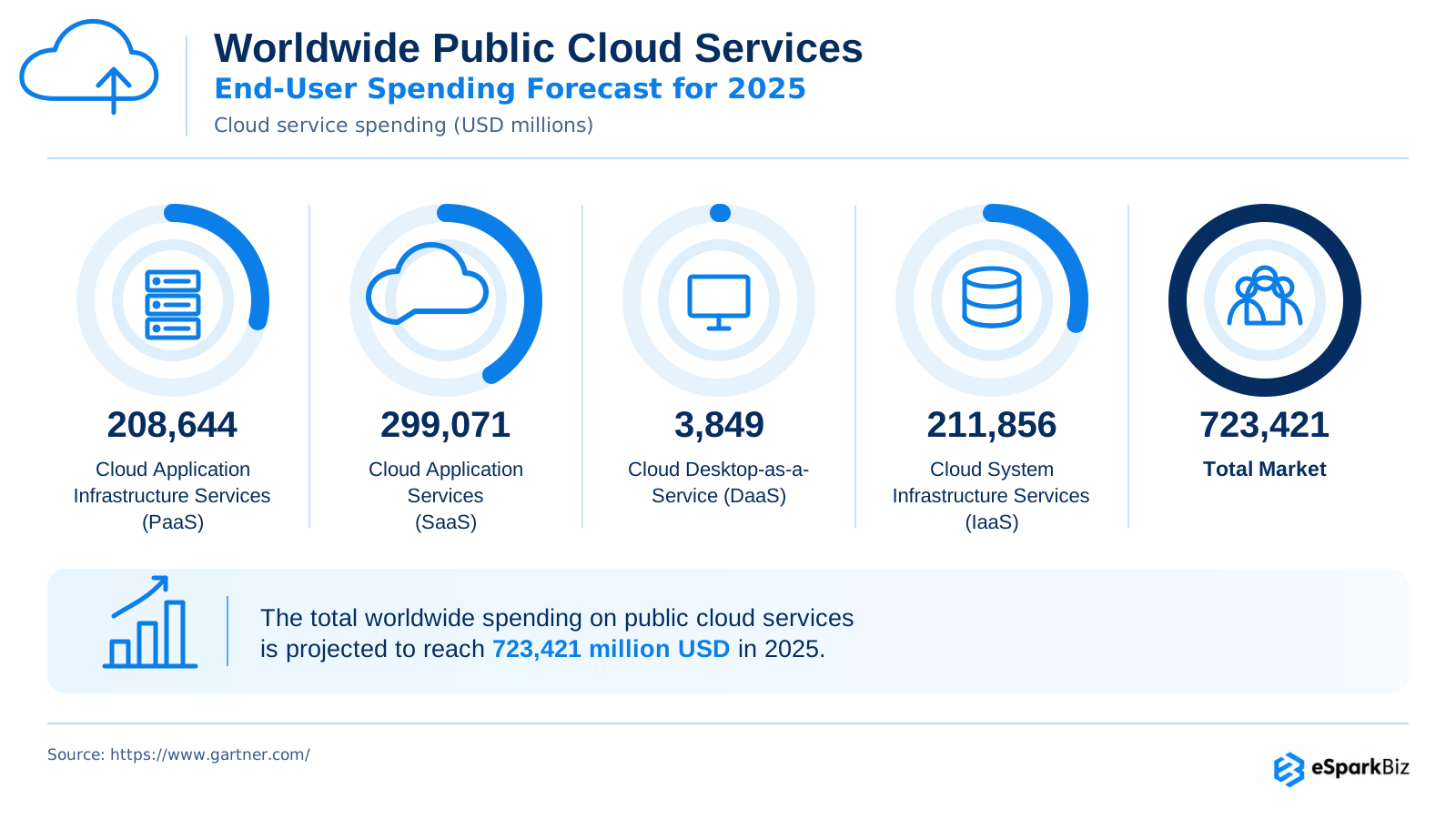
The cloud is no longer an experimental technology in the majority of companies today. Gartner reports that the spending on the public cloud in the last year amounted to $723 billion worldwide.
The larger problem is that the issues do not remain distinct. One’s decision on cost may influence the areas of security, competencies and even which cloud consulting provider one chooses. These issues will be examined in the following sections.
The Real Pattern: Why these challenges compound
Cloud issues usually don’t stay in their lane. A larger team may overlook some critical security setting that makes systems vulnerable. The same understaffing could result in no one noticing any unused cloud services running in the background and causing cloud costs to skyrocket.
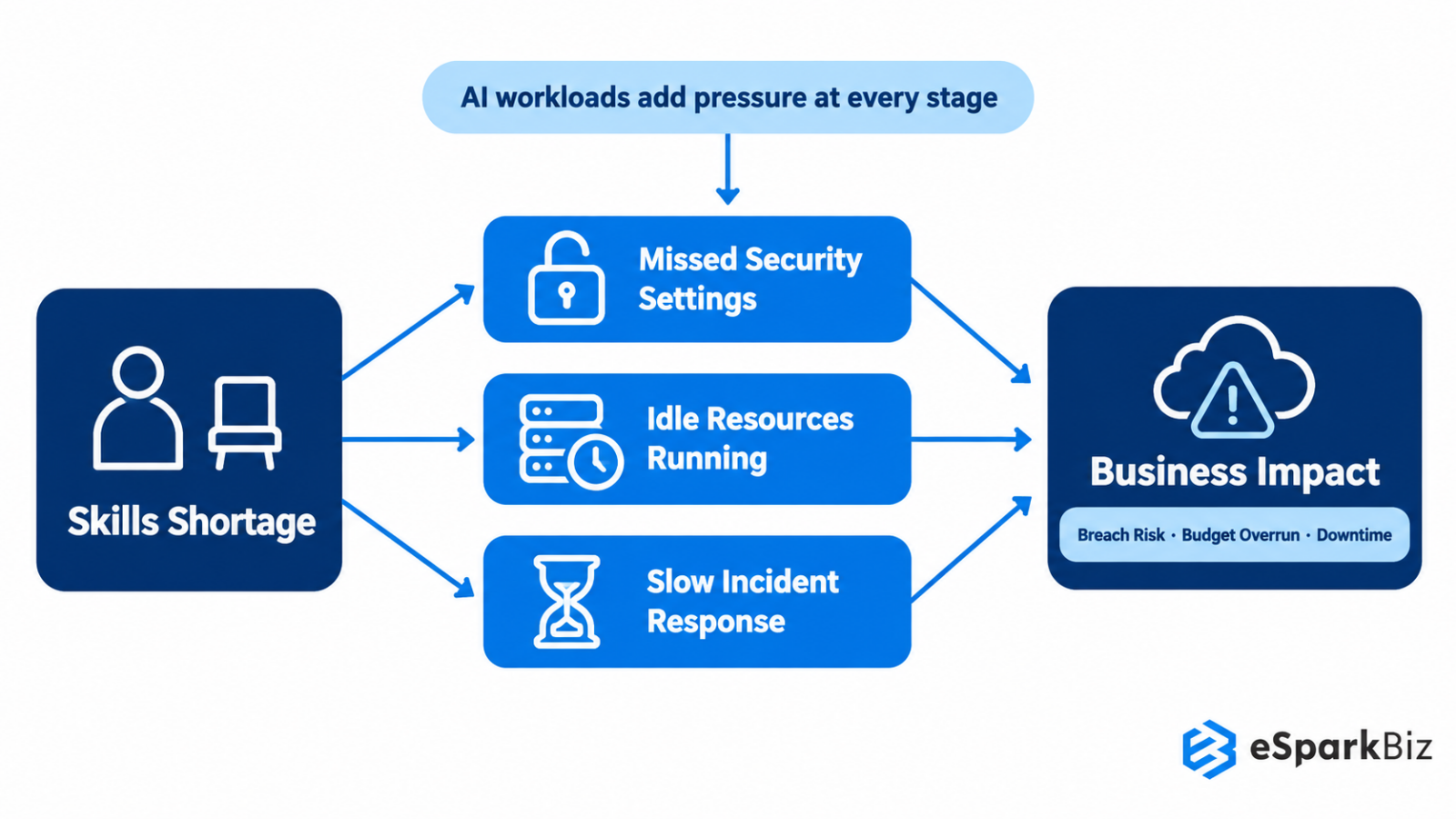
Staffing problems rarely remain as staffing problems. With fewer people observing the surroundings, available resources may become idle, security may not be maintained and problems may take longer to fix. Shortage of skills can be responsible for:
- Security vulnerabilities: Small errors can lead to breaches by hackers.
- Higher costs: Unused assets can keep running without being noticed.
- Slow reaction: Inadequate skills can complicate detection and repair of any issues.
Artificial Intelligence could add further pressure in this regard. The workload associated with AI usually requires considerable computing power, thus raising costs as well as additional systems to manage.
What it comes down to is the fact that cloud computing issues are related. An issue that began with hiring can ultimately lead to problems in security, finance and continuity.
Every cloud challenge, decoded in seconds
A single table, eight obstacles. Learn what is affecting companies the most and how to react immediately.
| Challenge | What It Looks Like | Business Impact | Fastest Fix |
| Cost Overruns | Bills creep silently | Budgets blown, trust eroded | Monthly spend review |
| Security Slip Ups | Settings left open | Breaches, reputation damage | Turn on MFA |
| Skills Shortage | Teams stretched thin | Slower rollouts, burnout | Hire outside help |
| Compliance Complexity | Rules vary by region | Fines, legal exposure | Confirm data location |
| Vendor Lock-In | Trapped or overextended | Less flexibility, higher costs | Avoid proprietary only tools |
| Downtime Risk | Provider’s bad day, your bad day | Lost revenue, angry customers | Have a backup plan |
| AI Infrastructure Strain | Chip shortages, rising demand | Costlier, less predictable | Match workload to infra |
| Environmental Impact | Data centers draw huge power | ESG scrutiny grows | Ask about sustainability |
Challenge 1: Cost Overruns and Cloud Waste
Pay-as-you-go cloud cost is similar to the meter of a taxi. Individually each charge might appear insignificant; however, it will soon mount up to be quite costly.
Common suspects include some fairly mundane possibilities:
- Test servers which are no longer needed but have been left on
- Resources which are bigger than necessary
- No review of how the money is being spent
It all comes down to how much of this infrastructure is actually utilized by your company. If you just have a small website or an online store, begin with billing alerts and periodic usage analysis. But for cloud applications that are more complex, you might want to involve a specialist.
To reduce cloud waste without slowing down engineering, follow these five practical FinOps steps:
- Tag resources: Label cloud resources by team, project and environment to track spending.
- Set budgets: Use spending limits and automated alerts to prevent unexpected costs.
- Rightsize resources: Adjust oversized instances based on actual usage without affecting performance.
- Use reserved capacity: Choose reserved instances or savings plans for predictable workloads to lower costs.
- Review monthly: Monitor cloud spending with engineering teams and remove unused resources regularly.
This approach helps control cloud costs while keeping development flexible and efficient.
To prevent unnecessary cloud spending, set practical guardrails such as budget alerts, automatic shutdown schedules for idle resources, mandatory resource tagging and approval requirements for large instances.
For example, consider a company spending $50,000 monthly on cloud infrastructure. Based on cloud cost optimization estimates, a 20 – 30% reduction could save $10,000 – $15,000 per month, bringing spending down to $35,000 – $40,000. A practical plan could involve 1 – 2 weeks of cost analysis, followed by 2 – 6 weeks of rightsizing, removing idle resources and optimizing pricing plans. Actual savings and timelines depend on infrastructure complexity and workload requirements.
Where to look first for cloud waste:
- Idle or unused cloud instances
- High data egress charges
- Old snapshots and backups
- Overprovisioned databases
- Excessive logging and storage costs
Regularly reviewing these areas helps reduce cloud waste without affecting essential workloads.
Challenge 2: Security Slip-Ups and Breaches
The typical picture that is associated with cloud breaches is a scenario where the perpetrator bypasses an advanced security solution. On the other hand, sometimes the attacks start from a more basic issue such as poor credentials or an insecure configuration.
And the financial implications of this can be substantial. According to research done by IBM in 2026, the average cost of data breaches around the globe is $4.99 million.
A security audit should first focus on three basic areas:
1. MFA
Include one more security check for critical accounts.
2. Access levels
Cut down unnecessary access rights to reduce who can get to confidential data.
3. Default configuration
Check security configuration before deploying cloud-based services.
This often overlooked area is capable of causing not one but two issues, one immediately and the other in the future.
And that is how we get back to the previous pattern: without the proper cloud skills, any security hole becomes easier to overlook and fix.
According to the Cloud Security Alliance’s 2026 Top Threats Report, identity weaknesses, insecure APIs and cloud misconfigurations remain major security concerns. Common mistakes include:
- Publicly exposed storage: Restrict bucket access and regularly audit permissions.
- Excessive access privileges: Apply least-privilege policies and review user roles.
- Insecure APIs: Enforce authentication, authorization and regular security testing.
- Poor credential management: Use MFA, rotate secrets and avoid hardcoded credentials.
Automated configuration scanning and continuous monitoring can help teams catch these mistakes before attackers exploit them.
Challenge 3: The Growing Cloud Skills Shortage
Cloud adoption can be seen as acquiring a car without having enough licensed drivers to drive that car. Cloud computing technology exists, but enterprises still require people who are capable of running the system, protecting it, optimizing cloud cost and repairing any faults.
This shortfall is not exclusive to professionals in cloud technology. On the other hand, according to projections by the U.S. Bureau of Labor Statistics, the occupation in computing infrastructure, data processing and web hosting will rise by 20.3% until 2034.
This presents a real challenge for business organizations as demand for such skillsets is increasing but taking the time to source people with them.
Training builds internal capability, but it takes time. Outside expertise can provide the faster answer when the business needs skills now.
For small businesses, specific training and external assistance may prove to be more viable than hiring a big cloud team. A growing organization can train its existing workforce along with hiring vetted Cloud experts for handling difficult tasks. Big organizations have the capability of developing teams as well as upgrading their skills. The right choice will depend on the size of the cloud that an organization uses and its importance.
Challenge 4: Compliance Complexity across Regions
What is considered normal behavior in one location can be considered a breach in another. This is due to the cloud since firms can store their data and work in many jurisdictions.
Here is how four widely encountered regulations differ:
| Regulation | Applies To | Covers | Consequence |
| HIPAA | Healthcare | Health data | Regulatory penalties |
| GDPR | EU businesses | Personal data | Fines and restrictions |
| PCI DSS | Card payments | Card data | Fines and loss |
| SOX | Public companies | Financial records | Legal penalties |
The cost of compliance issues can be high even before the incident takes place due to the remediation, penalties, contractual concerns or limitations imposed on how data will be used.
The CLOUD Act raises another issue because some of the providers based in the U.S. can be obliged to supply their data to U.S. law enforcement agencies using the qualifying legal process even though this data can be located abroad. However, it does not mean that any cloud-based file can be accessed immediately.
Challenge 5: Vendor Lock-In and Multi-Cloud
Single provider is easy to handle, but it could also lead to dependency on those services that are hard to substitute. Second provider is added to fix one of those issues, while providing additional options for security, agreements, integrations and monitoring.
A Quick Lock-In Check
Ask these questions:
- Is it possible to switch seamlessly? Otherwise, your systems may be overly dependent on one supplier.
- Do key functions depend on the supplier? Switching would cause a complete overhaul.
- Would switching impact business continuity? A difficult process could lead to increased dependence.
The business decision that can cause the next problem is avoiding the lock-in situation because it will result in creating a complicated structure to manage.
Only utilize multiple vendors when it is a benefit to the business but keep critical systems portable when possible.
Challenge 6: Downtime and Reliability Risk
The cloud service is similar to renting a building instead of owning one. The advantage you derive here is that someone else takes care of your infrastructure. However, there will be times when your organization suffers because you relied on someone else for maintenance.
The effects can spread quickly:
Impact on customers → Failed transactions, frustrated customers
Impact on operations → Staff unable to access critical systems
Financial impact → Loss of revenue, delayed business operations
The uptime guarantee is just one component of reliability. It’s how the company responds to the problem of downtime that really counts.
After considering the issue of availability, the next problem to consider will be whether or not your cloud computing environment remains manageable despite growth.
Challenge 7: AI Infrastructure Strain On Cloud
The basic question used to be answered this way: when a business requires more processing capacity, simply migrate the load to the cloud. The use of AI is complicating the answer to this question. According to Deloitte, inference is expected to account for two-thirds of AI compute by 2026.
It’s not just about GPUs, as some AI technologies need expensive chips, high power consumption and special cooling. Rapidly growing demand can make forecasts difficult. Moreover, according to Deloitte, the costs for manufacturing cutting-edge chips will increase in 2026.
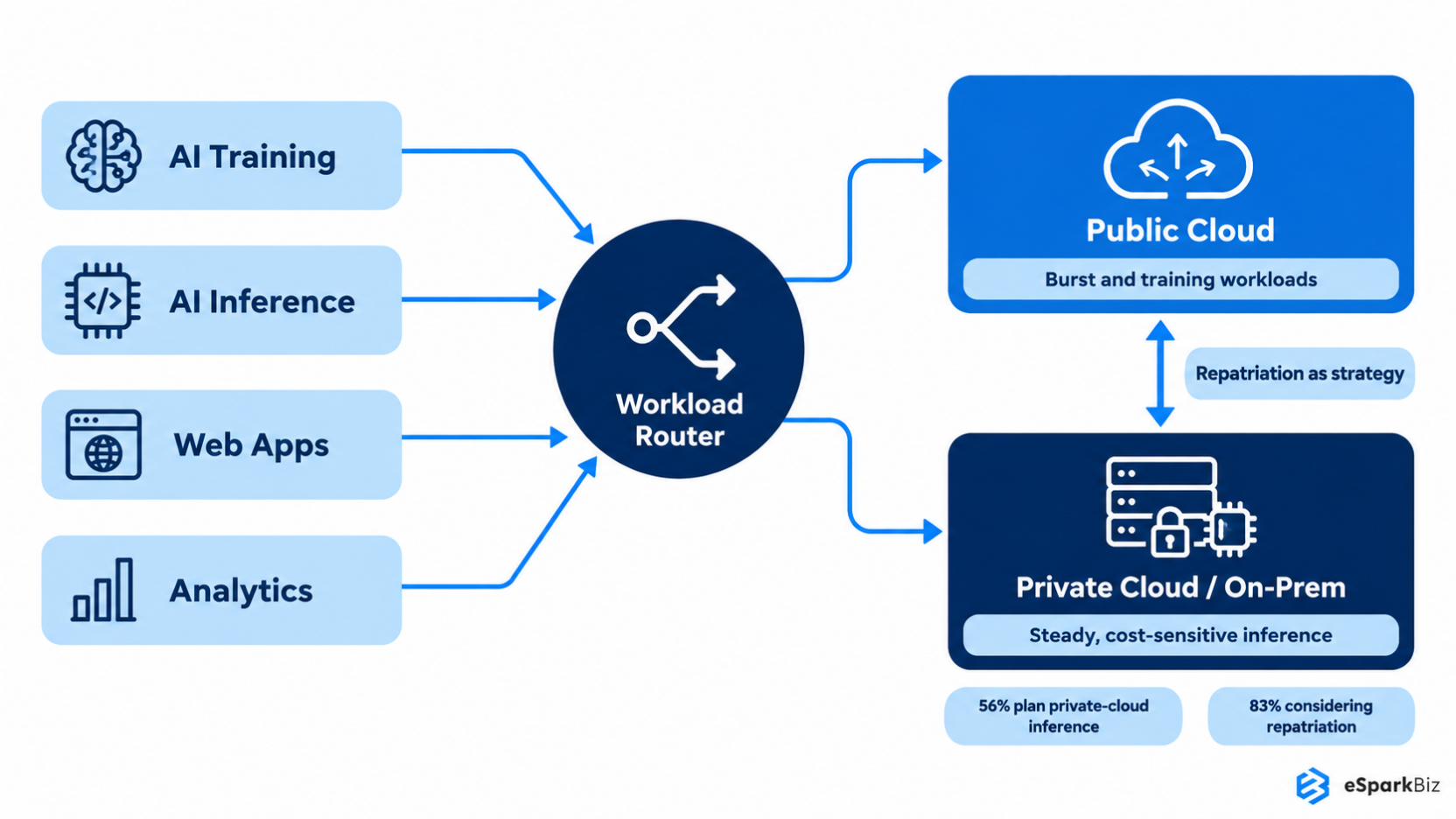
This is one reason why more organizations are rethinking how and where they will host AI workloads. Broadcom finds that 56% of enterprises are deploying or planning to deploy AI inference workloads on private cloud, with 83% considering workload repatriation.
Old Belief vs. 2026 Reality
| Belief | Reality | Why It Shifted | Signal to Watch |
| Cloud is default | Workload decides | AI economics changed | Cost per workload |
| GPUs are plentiful | Capacity varies | Demand surged | GPU availability |
| Repatriation means failure | Repatriation can mature | Cost and control | Private cloud use |
| AI means more cloud | AI needs choices | Workloads differ | Compute demand |
An organization can choose to shift one particular AI workload to private infrastructure, while others remain on public cloud infrastructure based on the cost, performance and infrastructure requirements of the workload.
Challenge 8: Environmental Impact Of Cloud Computing
Cloud computing workloads are rather intangible from a user perspective. Nevertheless, behind any stored file, any AI reaction and any processed transaction there are servers that consume energy.
That infrastructure comes with its share of environmental costs. Data centers account for approximately 1.5% of the world’s electricity use and this amount is set to rise sharply in the coming decade at least partly because of AI.
Cloud considerations now go beyond performance and cost considerations. Energy usage and the location of workloads are other aspects that may be of importance, especially to companies that have sustainability goals.
The regulators are still a component of the situation but they certainly don’t tell the whole story. The customer may demand more corporate responsibility regarding digital activities and the investor may see energy consumption as an element of business risk management.
What businesses are actually doing about this
Companies do not have to address all cloud computing issues at once. Instead, the pragmatic path would be to first consider those risks relevant to their scale, resources and workload capacity.
If you’re a small business
- Control costs: Set up billing alerts and check for unused cloud services periodically.
- Close skills gap: Train internal personnel while employing external experts for cloud operations.
If you’re a larger company
- Improve monitoring: Establish responsibility for security, cost, compliance and cloud management.
- Determine where to place workloads: Choose between public cloud, private environment or a combination of both.
Companies need to concentrate on avoiding a situation where one neglected problem creates another. The shortage of personnel can lead to a security problem. Inadequate cost visibility can affect architectural decisions. That is why the problems related to cloud computing have to be handled as interconnected business problems.
Cloud managed services help businesses address these challenges through continuous monitoring, expert support and proactive infrastructure management. Here’s how different managed services tackle common cloud computing problems:
| Cloud Challenge | Managed Service Solution | Key Benefit |
| Cost overruns and cloud waste | FinOps and cost optimization | Lower unnecessary spending |
| Security slip-ups and breaches | Managed cloud security | Stronger threat protection |
| Cloud skills shortages | Managed cloud operations | Access to cloud expertise |
| Compliance complexity | Compliance monitoring and audits | Reduced compliance risks |
| Vendor lock-in and multi-cloud complexity | Multi-cloud management | Better workload flexibility |
| Downtime and reliability risks | 24/7 monitoring and disaster recovery | Improved uptime and recovery |
| AI infrastructure strain | Infrastructure and capacity optimization | Better resource performance |
| Environmental impact | Resource and energy optimization | Reduced infrastructure waste |
By outsourcing routine cloud operations, businesses can improve cost control, security and reliability while allowing internal teams to focus on innovation and growth.
For a 60-person SaaS company using AWS without a dedicated DevOps engineer, prioritize these four areas:
- Cost visibility: Enable AWS Cost Explorer and billing alerts to identify unnecessary spending.
- Backups: Configure automated backups using AWS Backup and regularly test recovery.
- Identity and access management (IAM): Enforce MFA, remove unused permissions and follow least-privilege access.
- Monitoring: Set up Amazon CloudWatch alerts to detect performance issues and unusual activity early.
Start with these essentials before investing in complex multi-cloud strategies or advanced automation. This keeps cloud operations manageable without overwhelming a small engineering team.
Need to reduce cloud costs and close security gaps?
Companies offers cloud consulting and assessment services for AWS and Azure environments, covering infrastructure configurations, cloud spending, access controls, security vulnerabilities and compliance risks.
The assessment can deliver a cost optimization report, identified security gaps and a prioritized remediation roadmap. You can also discuss a fixed audit timeline and implementation milestones based on your infrastructure’s complexity.
🎥 Watch: Cloud Computing – Scalable and Flexible Cloud Services
When should you hand cloud operations to a Managed Services provider?
If your team struggles to control cloud costs, maintain security or handle frequent outages, it may be time to consider cloud managed services.
Start by auditing your infrastructure, identifying operational gaps and defining which responsibilities to outsource. A managed services provider can handle 24/7 monitoring, cost optimization, security management, backups and incident response under agreed service-level agreements (SLAs).
This allows your internal team to focus on development while cloud experts manage day-to-day operations.
Expert Insights
“As soon as complexity increases, things become much harder to scale and generalize.”
~ Werner Vogels, CTO, Amazon
Turning scattered real estate data into live business intelligence
Challenges: A real estate business had to deal with scattered data that was present in disparate systems and required people to manually prepare and structure the data for analysis. The fixed reports prevented further analysis and restricted other teams from accessing meaningful data because of static dashboards.
Solution: eSparkBiz built a centralized Cloud-native Business Intelligence Platform that enabled unification of the data using structured ETL pipelines and real time synchronization. The platform introduced features like visualizations, dashboards with roles, automated reporting and analytics to make sure that users could deal with live data and did not need spreadsheets for this purpose.
Results:
- 98% positive user feedback
- 55% increase in user retention
- 40% faster user onboarding
- 35% subscription growth after personalized dashboards and live analytics launched
Community Insights
According to a Reddit post, companies usually begin with easy cloud configurations and then keep on adding services and tools to them. This makes debugging and managing costs difficult whereas unplanned multi-cloud configurations tend to make things even more challenging.
How eSparkBiz helps businesses manage cloud challenges
Managing cloud costs, security risks, and infrastructure performance can become difficult without dedicated expertise. eSparkBiz offers cloud managed services to help businesses simplify cloud operations across AWS, Azure, and other cloud environments.
From cloud cost optimization and security management to infrastructure monitoring and performance improvements, eSparkBiz helps businesses reduce operational complexity and improve cloud efficiency.
Whether you’re a growing SaaS company or an enterprise managing complex workloads, eSparkBiz provides tailored cloud management solutions based on your infrastructure, business goals, and support requirements.
Frequently Asked Questions
Why does my cloud bill keep growing even though we haven't added new services?
Idle test servers, overprovisioned virtual machines and poor resource monitoring can silently increase cloud expenses. Additional costs may come from data egress fees, inefficient storage tiers and frequent API calls. Regular usage audits, storage optimization and billing alerts can help identify and control these hidden expenses.
Is cloud computing actually less secure than running our own servers?
Not necessarily. Many cloud security incidents stem from misconfigurations rather than weaknesses in the underlying infrastructure. The provider secures the cloud platform, while your team remains responsible for securing its configurations, access and data.
How long does it realistically take to close a cloud skills gap through training?
Meaningful cloud upskilling can take 12 months or longer to produce strong results. When a business faces immediate skills shortages, outside consultants or managed service providers can offer a faster way to access the expertise needed.
What is cloud repatriation and does it mean businesses are giving up on the cloud?
No. Cloud repatriation involves moving specific workloads back to owned or private infrastructure while keeping others in the cloud. It reflects more deliberate workload placement and cost management rather than a complete move away from cloud computing.
Why are cloud outages becoming more common with AI adoption?
AI is increasing demand for computing capacity, power and data-center infrastructure. Some analysts have raised concerns that this added pressure could affect reliability as providers expand AI infrastructure. Businesses should therefore consider how growing AI workloads could affect availability and recovery planning.
Does using multiple cloud providers actually reduce risk or add complexity?
It can do either, depending on how the environment is managed. Multi-cloud architecture can reduce dependence on one provider, but it also adds platforms, integrations, security policies and costs to manage. Consider these warning signs before adding another provider:
- Your team struggles to track spending across platforms
- Security policies are inconsistent between providers
- Integration issues slow routine projects
What engagement models, US-hour support and certifications does eSparkBiz offer?
eSparkBiz offers dedicated teams, staff augmentation and outsourcing, with cross-time-zone support. Credentials include ISO 27001:2022, SOC 2 and AWS Advanced Tier Partner status.
What are the main issues with cloud computing?
The main issues with cloud computing include rising costs, security vulnerabilities, data privacy concerns, compliance challenges, vendor lock-in, downtime and skills shortages. Businesses also struggle to manage cloud performance, scalability and infrastructure complexity.
How much do cloud managed services typically cost?
Common pricing models include flat monthly fees, percentage-based charges (typically 10 - 25% of cloud spending) and per-resource pricing. Fixed fees may range from $3,000 - $8,000 monthly, depending on infrastructure complexity and support requirements.
How are cloud managed services priced?
Cloud managed services typically use fixed monthly fees, percentage-based pricing or per-resource charges. eSparkBiz's managed services offer customized pricing based on infrastructure complexity, workloads and support needs.


 October 09, 2026