


Python applications can stay fast as workloads increase when you choose the right performance improvements. This guide assists you to take practical ways to improve speed, reduce resource usage and handle production needs.
- Prioritize high impact performance issues.
- Understand modern Python performance changes.
- Know when tuning is no longer enough.
Python can feel slow when an application is performing heavy calculations, huge amounts of data or many database and API requests. But, Python itself is not always the problem. A slow database query, repeated task or inefficient data flow may cause more delay than the Python code.
Python 3.14 also shows why runtime improvement matters. Preliminary benchmarks report a 3 – 5% average performance gain from its new interpreter design across the standard pyperformance suite, depending on the platform and architecture. For production teams, incremental runtime gains can reduce processing time & resources consumption.
Effective Python optimization starts with identifying the changes that can improve your specific workload. We selected these tips based on practical impact, required effort, workload relevance and measurable result across application speed, resources usage, database performance & overall production efficiency.
Tier 1: Identify Performance Issues, Then Fix the Biggest Ones
Start with clear performance data, then focus your engineering work on changes that can provide the biggest improvement in speed, resource usage and production efficiency.
1. Measure First with a Sampling Profiler
Before optimizing Python code, identify what makes your application slow. Profile a slow request or large loop step by step:
- Reproduce the issue: Identify the slow API endpoint or run the script with representative input data.
- Measure execution time: Check Python processing, database queries, and external API calls separately. Use timeit to benchmark small code sections.
- Find the slowest operation: Use tools such as py-spy to identify CPU hotspots and application traces to investigate I/O delays. Use cProfile to find time-consuming functions.
- Optimize and retest: Fix the slowest operation first and compare response times.
For example, if a request spends 420 ms on a database query but only 15 ms processing Python code, investigate the query before optimizing Python functions. Similarly, profile large loops to identify expensive operations before rewriting them.
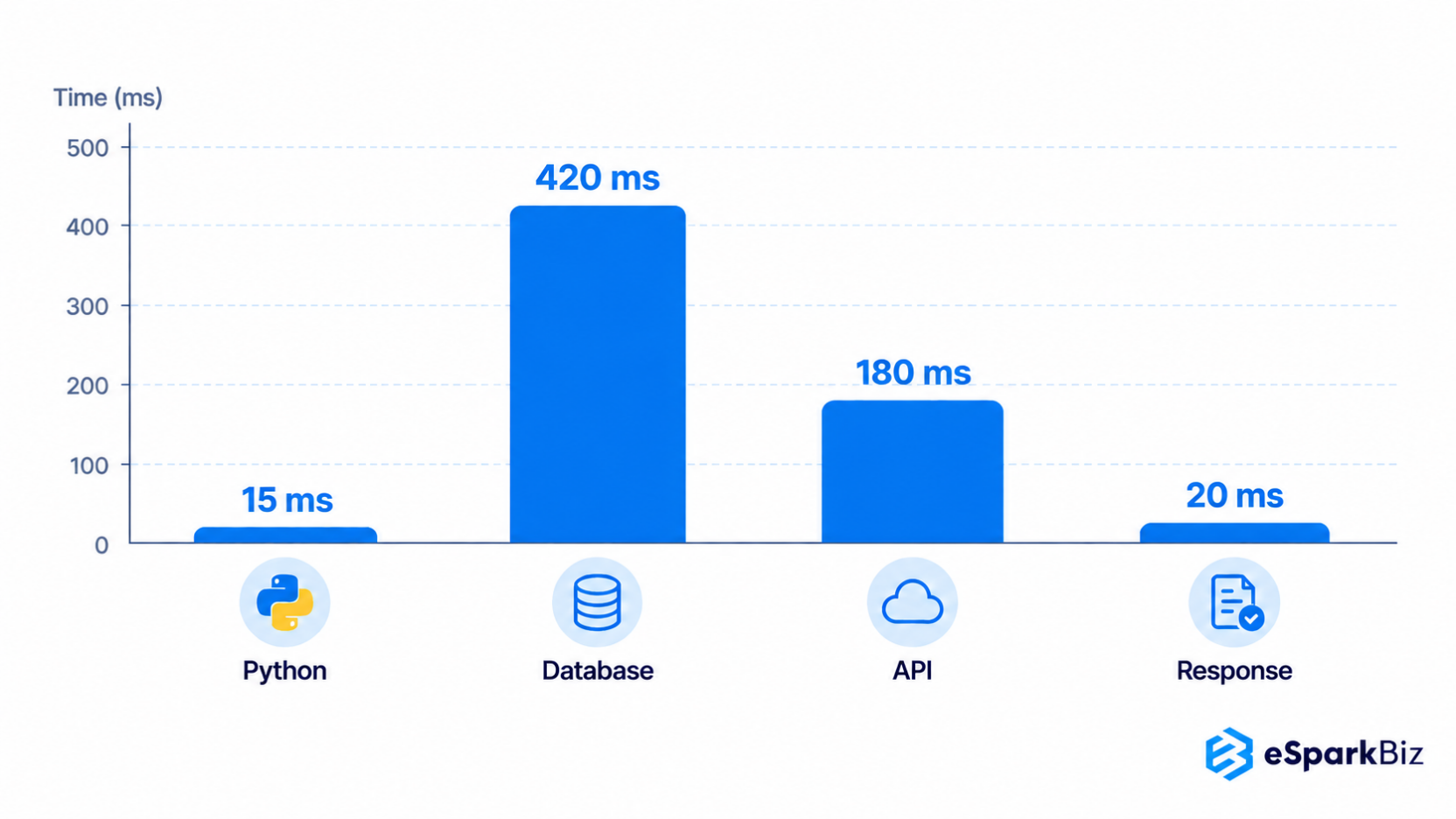
Request
├── Python processing 15 ms
├── Database query 420 ms ← main source of delay
├── External API call 180 ms
└── Response processing 20 ms
2. Move to a Current Python Version
Using an older Python version can mean missing out on performance improvement. The newer version can improve the execution speed, memory usage & runtime feature without requiring major changes to your application.
Before upgrading, check:
- Library support: Confirm your framework and dependency to support the target version.
- Application behavior: Run your existing test against the new version.
- Performance: Compare response times and resources usage before & after the upgrade.
- Production readiness: Test under realistic traffic before switching production workloads.
For example, if your application currently runs on Python 3.11, compare it against a supported newer release:
Python 3.11 → Baseline performance
Python 3.14 → Measure again
3. Fix Slow Database Queries and Repeated Calls
Your Python code may run efficiently, but the applications can still feel slow because it is waiting for the database. Repeated queries can also increase database load and waste processing time.
Start by checking:
- Query duration: Which queries take the longest time?
- Query frequency: Is the same data being requested repeatedly?
- Indexes: Can an index reduces the amount of data that the database needs to scan?
- Database calls: Can several requests be combined into one efficient query?
For example, this pattern can create unnecessary database work:
for user_id in user_ids:
user = db.get_user(user_id)
Fetching the required records together can reduce the number of database calls:
Example: Optimizing a Slow Django Endpoint
Apply the first three fixes in order:
- Profile: Use py-spy and request traces to identify CPU hotspots and slow database queries.
- Upgrade Python: Test a newer supported version and compare performance.
- Optimize queries: Use Django ORM methods to fetch related records efficiently and add indexes where needed.
# Before: Repeated database queriesfor user_id in user_ids: user = User.objects.get(id=user_id)
# After: Fetch records together
users = User.objects.filter(id__in=user_ids)
4. Cache Repeated Work
If your application keeps calculating or fetching the same results, you may be using resources on work that only need to happen once. cache saves frequently used result so they can be returned faster.
Caching can help with:
- Expensive database queries
- External API response
- Repeated calculation
- Frequently requested application data
For example:
if key in cache: return cache[key]
result = calculate_report(key)
cache[key] = result
return result
5. Use the Right Data Tools
Python Development can become slow when processing large amount of data with standard loops & objects. The right data tool can handle the same work more efficiently by using optimized operation behind the scenes.
Consider the workload:
- NumPy: Numerical calculations and arrays
- pandas: Structured data analysis and tabular workload
- Polars: Data processing where fast execution and efficient memory use matter
- Numba: Python functions that contain repeated numerical calculation
For example, instead of processing every value through a Python loop:
A numerical workload may benefit from an array based approach:
Python Performance in Practice
When standard Python tools are not enough for data heavy workloads, GPU acceleration can help improve execution speed. This SciPy 2026 presentation show how profiling and tools such as CuPy, Numba CUDA & NVIDIA Nsight can optimize Python workloads.
Watch the Presentation:
Tier 2: Better Ways to Handle Workloads and Data
Match your application’s workload with the right processing approaches, from asynchronous tasks and background jobs to parallel execution & efficient data handling.
1. Use Async for Waiting Heavy Work
If your Python application spend most of its time waiting for databases, API, network requests or other I/O, asynchronous programming can let it handle other work during that waiting time.
Think of it like a restaurant server. Instead of waiting at one table until the kitchen finish an order, the server can take another order and return when the first meal is ready.
Async can help when your application handles:
- Multiple API requests
- Network operation
- Database calls that support async driver
- Many concurrent connections
async def fetch_data(): result = await api_call()
return result
Async is not a shortcut for every performance problems. It is most useful when your application spends significant time for waiting. For CPU heavy calculations, other approaches such as processes or separate interpreters may be more appropriate.
2. Move Slow Tasks to Background Workers
Some tasks don’t need to be finished before the user get a response. Sending emails, generating reports, processing files or running scheduled calculation can happen in the background instead.
Instead of making the user wait:
User request
↓
Python application
↓
Queue
↓
Background worker
↓
Task completed
This approach keep the main request focused on work that directly affects the user.
Background workers work well for:
- Report generation
- Email & notification processing
- File conversion
- Data imports & exports
- Scheduled calculations
Tools such as Celery can manage queued tasks across worker processes. The right setup depend on task duration, traffic, failure handling and how much work can safely run outside the user’s request.
3. Run Heavy CPU Work in Parallel
Some Python tasks need more CPU power instead of more waiting time. Image processing, large calculations, data transformations and other CPU heavy tasks can benefit from parallel execution.
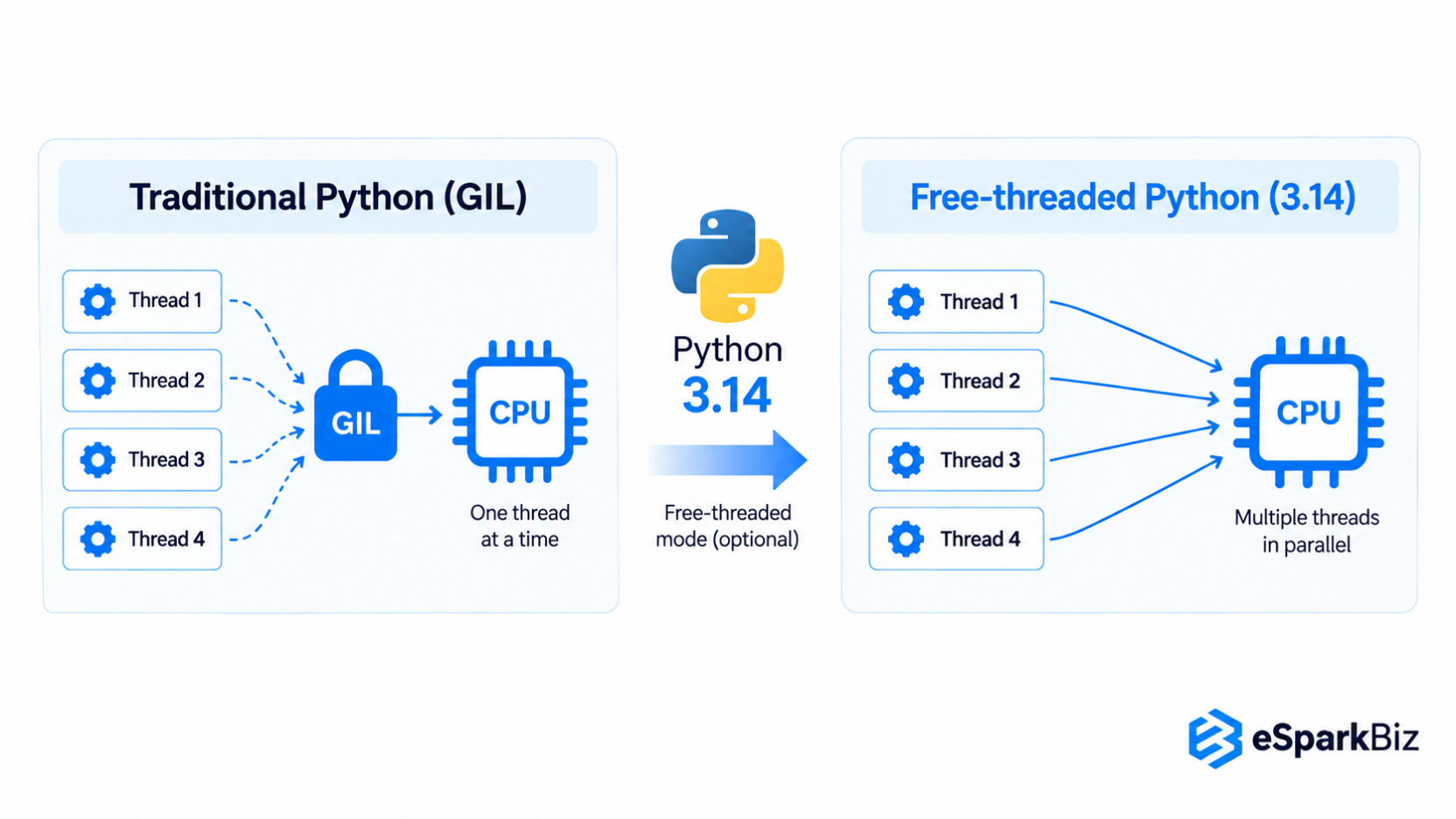
Python 3.14 add InterpreterPoolExecutor, which allows separate Python interpreters to run tasks independent. Each interpreter has its own GIL, allowing CPU heavy tasks to run across multiple CPU cores.
from concurrent.futures import InterpreterPoolExecutorwith InterpreterPoolExecutor() as executor:
results = list(executor.map(process_data, items))
You can also use process based parallelism when it fits your application better.
Before choosing either approach, consider:
- How much CPU takes time for each task needs?
- How much data must be shared?
- Startup & communication costs
- Whether your libraries support the chosen approach?
Parallel execution can improve completely, but it also adds complexity. Measure the actual workload before introducing it.
4. Test Free Threaded Python for Thread Heavy CPU Work
Free threaded Python allows multiple threads to execute Python code at the same time without relying on the traditional GIL. Python 3.14 officially support this mode, but it is optional and may not to improve every workload.
It is worth testing when your application has:
- CPU heavy tasks that can run independent.
- Existing thread based processes.
- Libraries that support free threaded execution.
- Workloads where adding processes would create the unnecessary overhead.
Before switching, test your dependencies carefully. Some third party extensions may still depends on the traditional GIL and free threaded execution can have different memory and performance results.
Treat it as a workload specific optimization, not a default setting. Run the same production like the workload with and without free threaded Python, then compare execution time, CPU used, memory usage & overall throughput.
5. Pick the Right Data Structure
The data structure you choose can affect how quickly Python finds, adds, removes or check data. A simple choices can save repeated work when an application handles large collections.
Use the structure that matches the operation:
| Operation | Recommended Structure | Best For |
| Ordered collection | list | Keeping items in sequence and accessing them by position |
| Fast membership checks | set | Checking whether a value exists |
| Key value lookups | dict | Finding data using a unique key |
| Queue operations | collections.deque | Adding & removing items from both ends |
For example, checking membership in a large list can require Python to examine items one by one:
if user_id in user_ids: process_user(user_id)
A set is usually better when membership checks happen frequently:
user_ids = set(user_ids)if user_id in user_ids:
process_user(user_id)
The right choices depends on how your application reads and modifies data. Focus on the operations your code perform most often rather than choosing a structure based only on its general reputation for speed.
6. Stream Large Data with Generators and Chunks
Loading a large dataset into memory at once can increase memory use and slow down your application. Generators and chunked processes let Python handle data in smaller portions.
A generator produces values only when your code needs them:
def read_records(records): for record in records:
yield process(record)
for result in read_records(records):
save(result)
For database queries or large files, process records in batches:
Large dataset
↓
Batch 1 → Process → Release
Batch 2 → Process → Release
Batch 3 → Process → Release
This approach can help when working with:
- Large database result sets
- CSV or log files
- Data imports & exports
- Memory sensitive workloads
The right batch size depend on your data, processing time and available memory. Test different batch sizes and monitor memory usage and processing time before choosing a production setting.
Developer Growth
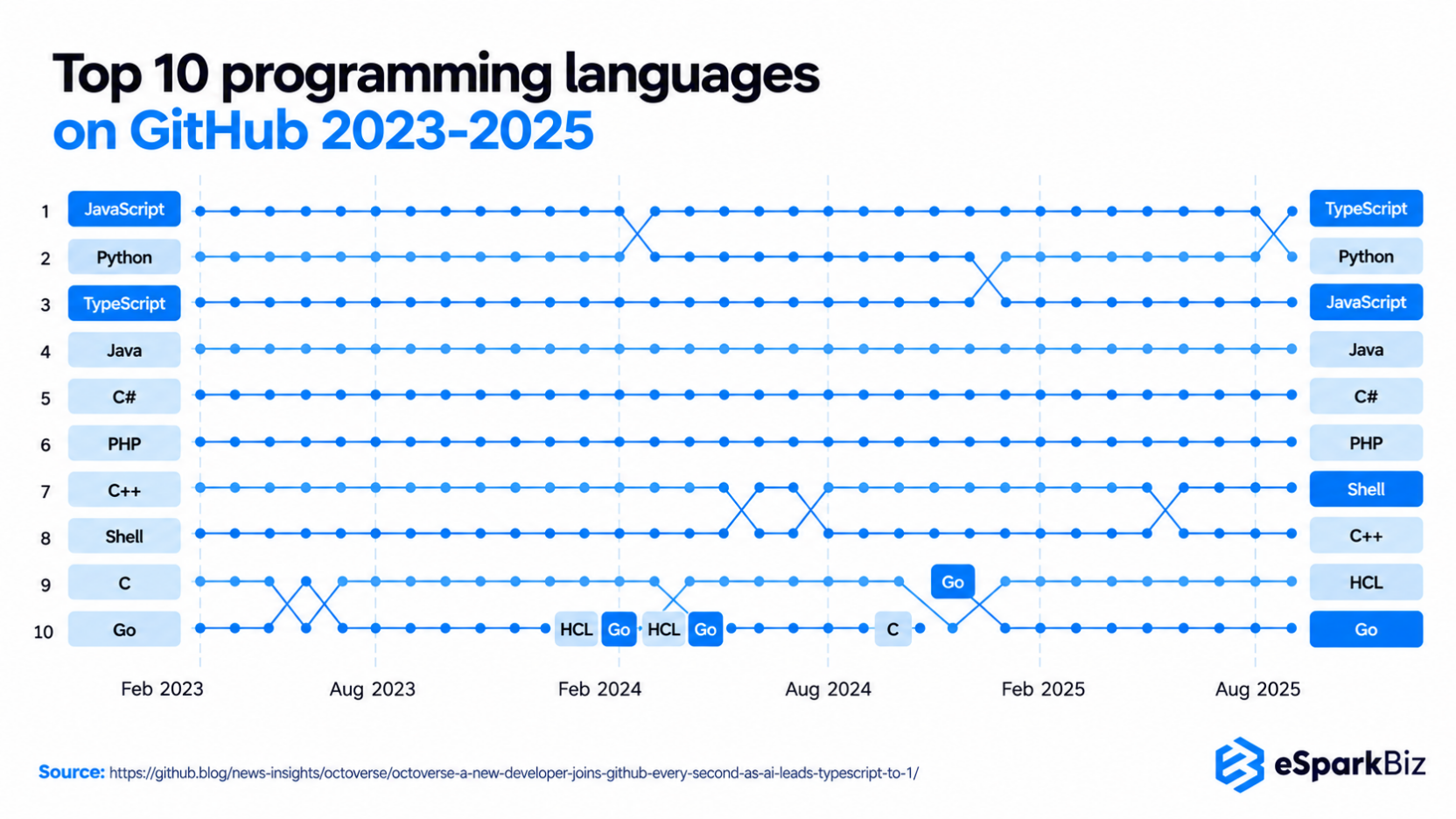
Python added more than 850,579 GitHub contributors, showing that its developer community grew by about 48.78% compared with the previous year.
Tier 3: Improve Startup Time and Code Efficiency
Improve startup speed, optimize performance critical code and apply small coding practices that can reduce unnecessary processing without adding complexity to the application.
1. Cut Startup Time with Lazy Imports
Not every application need to load every module when it starts. For command line tools, serverless functions and short running jobs, unnecessary imports can add noticeable startup period.
Instead of loading a module at startup:
import heavy_module
def run():
return heavy_module.process()
You can import it only when the function needs it:
def run(): import heavy_module
return heavy_module.process()
This approach can help when:
- An application start frequently.
- Only some features that use certain libraries.
- Startup time that affects user experience.
- Memory usage matters during short execution.
Do not move every import inside a function. Imports that are used throughout the application are usually better to kept at module level. Measure startup time before & after the change to confirm that lazy imports provide a meaningful improvements.
2. Compile Performance Critical Python Code
If profiling show that a small section of Python code takes a large share of execution time, compiling that code can be worth testing. This is especially useful for repeated numerical calculations and CPU heavy loop.
Options include:
- Cython: Compile selected Python like code into C extensions.
- Numba: Compile supported numerical Python functions at runtime.
- Experimental JIT: Test Python’s newer JIT capabilities when your workload and runtime support them.
For example, Numba can compile a numerical function:
from numba import jit@jit
def calculate(values):
total = 0
for value in values:
total += value * value
return total
Compiled approach add build, testing and maintenance considerations. Start with a measured performance hotspot rather than rewriting large part of the application. Compare execution time, memory use & operational complexity before adopting the change.
Community Insight
Rust usage for Python extension grew 22% in one year, showing growing interest in combining Python’s flexibility with native code performance. This trend give vetted Python developers another option when the Python code need faster execution for performance heavy workloads.
3. Use Built-Ins and Small Code Habits
Small coding choice will not transform an application on their own, but they can reduce the unnecessary work in frequently executed code. Python’s built-in operations are often implemented efficiently, so use them before adding custom logics.
For example, prefer:
over manually calculating the same result:
total = 0for value in values:
total += value
Other useful habits include:
- Use any() or all() when you only need the condition check.
- Avoid recalculating the same values inside a loop.
- Move constant calculations outside from frequently repeated code.
- Use local variables when a value is accessed repeatedly.
These changes matter most inside the loop or frequently called function. Keep readability in mind that a small speed improvement is rarely worth making production code harder to understand or to maintain.
4. Add Performance Checks to Every Release
Performance can regress when new features, dependency or code changes alter how an application uses CPU, memory, databases or any external services. Regular check up helps to catch those changes before they affect production users.
Add performance checks to your development process:
- Set key metrics: Track the response time, CPU use, memory use & database query time.
- Compare releases: Run the same workload against the current and previous version.
- Test critical paths: Focus on high traffic API, expensive calculations and the frequent database operations.
- Review generated code: If AI tools produces code, check its algorithmic complexities, database calls, memory use & unnecessary processing before merging it.
A simple Python performance test can look like:
Code change
↓
Performance test
↓
Compare results
↓
Review significant regression
↓
Release
Performance should be part of code review and release testing, not a task reserved for when users start reporting slowdowns.
Choose the Right Fix for your Python Performance Problem
Common Python performance mistakes in production include optimizing without profiling, inefficient database queries, excessive memory usage, and blocking background work. The right fix depends on where time is spent, the workload involved, and how much change the application can support.
| Problem Area | First Check | Recommended Action | Potential Benefit | Best Use Case |
| Slow API responses | Request traces and external calls | Optimize database queries, API calls or waiting time | Faster response times | APIs spend significant time waiting |
| High CPU usage | Profiler results & hot functions | Use compiled code or parallel execution | Lower processing time | CPU heavy operations dominate execution |
| High memory usage | Object allocation and data volume | Stream data, use generators or review data structures | Lower memory consumption | Large datasets increase memory pressure |
| Repeated database work | Query frequency and duration | Cache results or combine repeated queries | Fewer database operations | The same data is requested repeatedly |
| Heavy background processing | Task duration & request impact | Move non urgent work to background workers | Faster user facing requests | Tasks do not need immediate completion |
| Performance varies by workload | CPU, I/O, memory and traffic patterns | Benchmark different workloads before choosing an optimization | More consistent performance | Different workloads produce different results |
The key is to identify the cause before changing code. Profile first, apply the fix that matches the problem, and benchmark the result to confirm the improvement.
How to Choose a Python Performance Optimization Partner
Choosing a Python development company to optimize a slow Django or FastAPI application requires evaluating technical expertise, production experience, and collaboration practices. For US companies, time-zone overlap and clear project terms also affect how efficiently teams can diagnose and resolve performance issues.
When evaluating providers such as eSparkBiz, consider these factors:
- Performance expertise: Experience with profiling, database optimization, caching, and production monitoring.
- Framework knowledge: Practical experience optimizing Django and FastAPI applications under real workloads.
- US team collaboration: Overlapping working hours, clear communication, and defined contracts.
- Measurable results: Benchmarks, response-time improvements, and documented findings.
- Language selection: Ability to assess whether optimizing Python is sufficient or rewriting performance-critical components in Go or Rust offers a measurable advantage.
- Hiring Python developers: Hire Python developers with experience in performance profiling, code optimization, and backend tuning to improve existing applications before considering a rewrite.
Ask potential partners to audit your backend first and compare optimization costs, rewrite complexity, and expected performance gains before recommending either approach.
Frequently Asked Questions
How much engineering time does it take to optimize a slow Python backend, and when is a rewrite cheaper?
Simple fixes, such as query optimization or caching, may take hours to days, while broader improvements can take weeks. A rewrite makes sense when architectural limitations, maintenance costs, and performance requirements outweigh incremental optimization costs.
What should I do if my Python application becomes slower as the workload and amount of data increase?
Start with profiling and real workload measurements. Identify the slower operations, then the optimize data handling, database access, memory use or processing.
Asyncio vs. multiprocessing vs. free-threaded Python 3.14: Which should I use to speed up my Python service?
|
Approach |
Best Use Case |
Key Benefit |
|
asyncio |
I/O-bound tasks, such as API requests and database calls |
Handles concurrent operations efficiently |
|
multiprocessing |
CPU-intensive tasks, such as data processing and complex calculations |
Uses multiple CPU cores for parallel execution |
|
Free-threaded Python 3.14 |
CPU-bound multithreaded workloads with compatible dependencies |
Enables parallel Python execution without the GIL |
Choose asyncio for I/O-bound workloads, multiprocessing for CPU-intensive tasks, and free-threaded Python 3.14 when compatible libraries and benchmarks demonstrate better multithreaded performance. Profile your service before deciding.
Can upgrading to a newer Python version improve the performance of my existing application?
The newer Python version can improve runtime performance, but actual gains depend on your application, dependencies, workloads and the production environment.
Should I use asynchronous programming when my Python application handles many API and database requests?
Async Python can improve responsiveness for I/O heavy application, but CPU intensive workloads usually need parallel execution, processes or compiled code.
What are some practical ways to reduce memory usage when processing large datasets in Python?
Use generators, process large dataset in chunks, choose efficient data structures and avoid unnecessary copies or duplicate data in the memory.
How much does a Python performance optimization audit cost, and how long does it take to see results in production?
Costs and timelines depend on the application's complexity and testing requirements:
- Audit duration: A focused audit may take a few days, while complex systems may require weeks.
- Optimization costs: Depend on the issues identified and the engineering effort required.
- Production results: Simple fixes may improve performance quickly, but verify improvements through benchmarking and monitoring.
How can I determine which Python performance optimization is right for my application?
Measure the source of the delay first, then choose an optimization based on workload type, resource usage, data size and application requirements.
I keep hitting performance anti-patterns in our Python codebase. How do I identify performance issues systematically?
Profile your application using cProfile or py-spy to identify CPU-intensive functions. Check database queries, repeated calculations, memory usage, and external API latency. Benchmark critical operations, fix the biggest performance issue first, and retest under realistic workloads to verify improvements.


 August 19, 2026